

- Node
- Ruby
- Python
- PHP
- .NET
- Java
- Go
Overview
You can use speech input or dual-tone multi-frequency (DTMF) tones (a.k.a. Touch-Tone) to route callers or otherwise change call flows for applications such as interactive voice response (IVR), virtual assistants, and mobile surveys.Prerequisites
To get started, you need a Plivo account — sign up with your work email address if you don’t have one already. You must have a voice-enabled Plivo phone number to receive incoming calls; you can rent numbers from the Numbers page of the Plivo console, or by using the Numbers API. If this is your first time using Plivo APIs, follow our instructions to set up a Node.js development environment and a web server and safely expose that server to the internet.Detect DTMF input
How it works
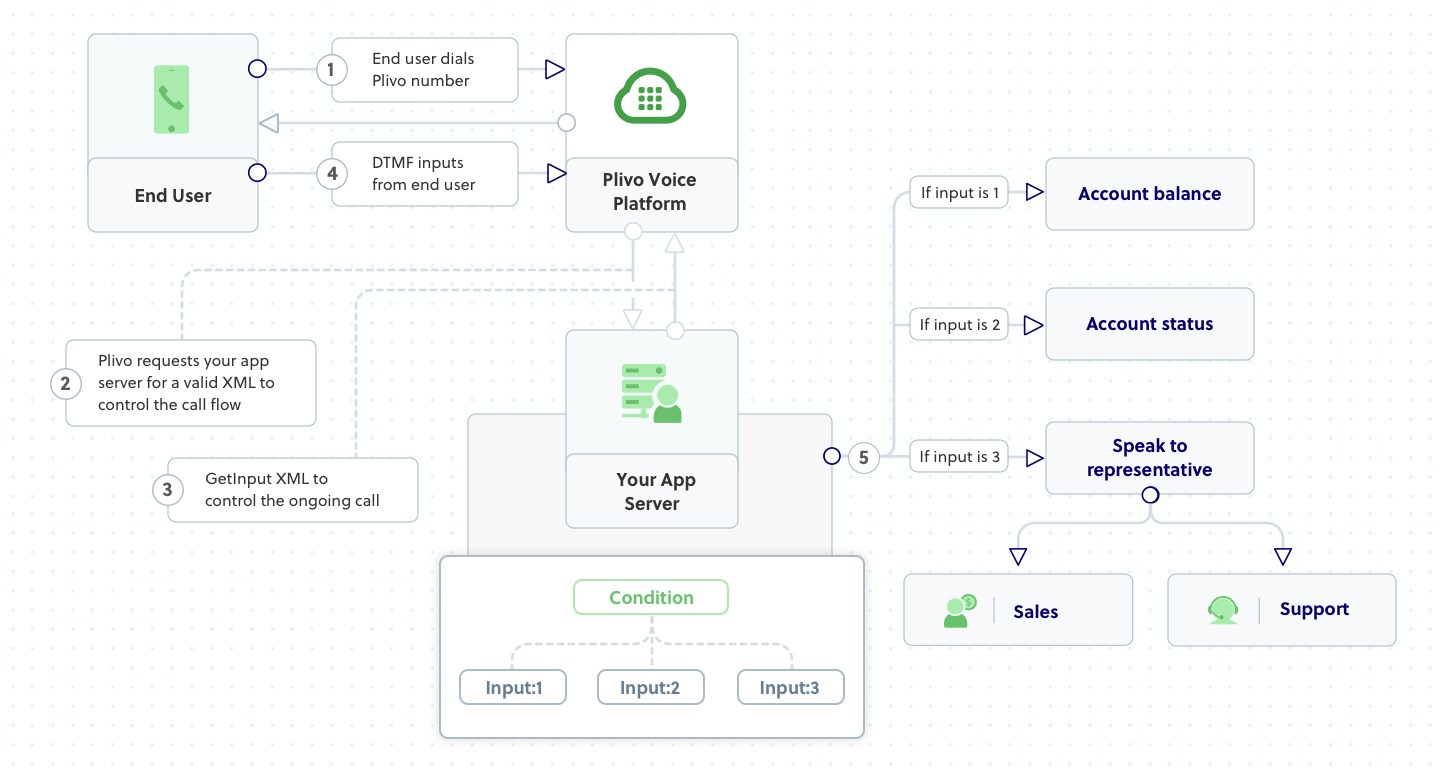
Code
Create a file calleddetect_dtmf.js and paste into it this code.var plivo = require('plivo');
var express = require('express');
var app = express();
app.set('port', (process.env.PORT || 5000));
app.use(express.static(__dirname + '/public'));
// Welcome message, first branch
var WelcomeMessage = "Welcome to the demo. Press 1 for your account balance. Press 2 for your account status. Press 3 to speak to a representative"
// Message for second branch
var RepresentativeBranch = "Press 1 for sales. Press 2 for support"
// Message that Plivo reads when the caller does nothing
var NoInput = "Sorry, I didn't catch that. Please hang up and try again"
// Message that Plivo reads when the caller presses a wrong digit
var WrongInput = "Sorry, that's not a valid input"
app.all('/multilevelivr/', function (request, response) {
if (request.method == "GET") {
var r = new plivo.Response();
const get_input = r.addGetInput(
{
'action': 'https://<ngrok_identifier>.ngrok.io/multilevelivr/firstbranch/',
"method": 'POST',
'inputType': 'dtmf',
'digitEndTimeout': '5',
'language': 'en-US',
'redirect': 'true',
});
get_input.addSpeak(WelcomeMessage);
r.addSpeak(NoInput);
console.log(r.toXML());
response.set({ 'Content-Type': 'text/xml' });
response.end(r.toXML());
}
});
app.all('/multilevelivr/firstbranch/', function (request, response) {
var digits = request.query.Digits;
console.log("Digit pressed", digits)
var r = new plivo.Response();
if (digits == "1") {
var BalMessage = "Your account balance is $20";
r.addSpeak(BalMessage);
}
else if (digits == "2") {
var StatMessage = "Your account status is active"
r.addSpeak(StatMessage);
}
else if (digits == "3") {
const get_input = r.addGetInput(
{
'action': 'https://<ngrok_identifier>.ngrok.io/multilevelivr/secondbranch/',
"method": 'POST',
'inputType': 'dtmf',
'digitEndTimeout': '5',
'language': 'en-US',
'redirect': 'false',
'profanityFilter': 'true'
});
get_input.addSpeak(RepresentativeBranch, voice = "Polly.Salli", language = "en-US");
r.addSpeak(NoInput);
console.log(r.toXML());
}
else {
r.addSpeak(WrongInput);
}
response.set({ 'Content-Type': 'text/xml' });
response.end(r.toXML());
});
app.all('/multilevelivr/secondbranch/', function (request, response) {
var from_number = request.query.From;
var digits = request.query.Digits;
console.log("Digit pressed", digits)
var r = new plivo.Response();
var params = {
'action': "https://<ngrok_identifier>.ngrok.io/multilevelivr/action/",
'method': "POST",
'redirect': "false",
'callerId': from_number
};
var dial = r.addDial(params);
if (digits == "1") {
dial.addNumber("<number_1>");
console.log(r.toXML());
}
else if (digits == "2") {
dial.addNumber("<number_2>");
console.log(r.toXML());
}
else {
r.addSpeak(WrongInput);
}
response.set({ 'Content-Type': 'text/xml' });
response.end(r.toXML());
});
app.listen(app.get('port'), function () {
console.log('Node app is running on port', app.get('port'));
});
$ node detect_dtmf.js
Control the gathering of DTMF input
You can improve DTMF collection by using attributes available for the GetInput XML element, such as digitEndTimeout, numDigit, finishOnKey, and executionTimeout.digitEndTimeout sets the maximum time interval between successive digit inputs. The default value isauto and other allowed values are 2 to 10 seconds. If the user provides no new digits within the digitEndTimeout period, the digits entered to that point will be processed.numDigits sets the maximum number of digits the user can provide on the current call. The default value is 32 and the allowed values are 1 to 32.If the user provides more digits than the value of numDigits, Plivo will send only the number of digits specified as numDigits to the action URL; additional digit inputs will be ignored. For example, if numDigits is specified as “4” and the user enters five digits, the last digit will be ignored.finishOnKey defines a key that users can press to submit the digits they entered. The default value is # and additional allowed values are 0-9, *, <empty string>, and ”none.” When you set the value to <empty string> or “none,” DTMF input collection ends depending on the digitEndTimeout or the numDigits attribute.Note: These three attributes apply to input types
dtmf and dtmf speech and do not apply to input type speech. If all three of these attributes are specified, the priority is for finishOnKey.Detect speech input
The GetInput XML element can also capture speech input.How it works
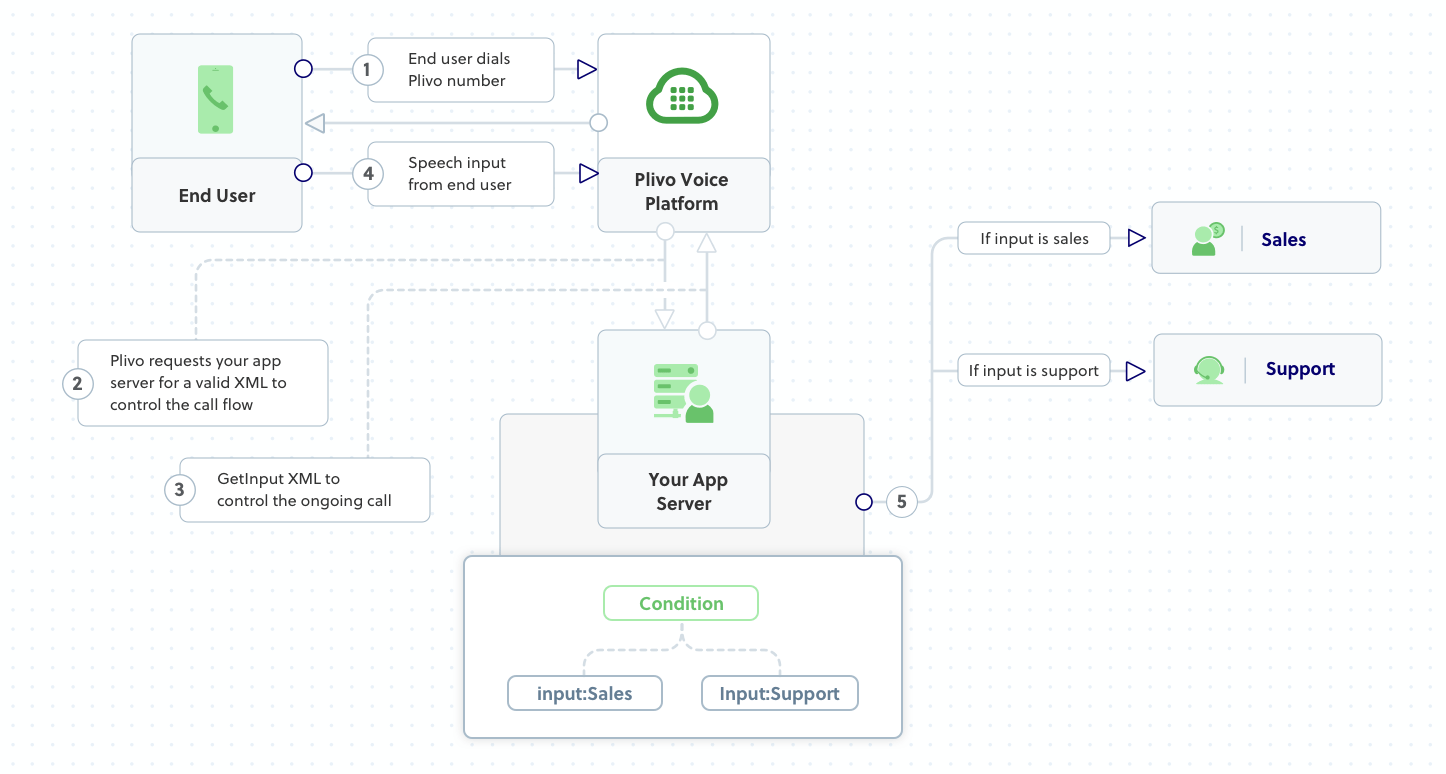
Code
Create a file calleddetect_speech.js and paste into it this code.var plivo = require('plivo');
var express = require('express');
var app = express();
app.set('port', (process.env.PORT || 5000));
app.use(express.static(__dirname + '/public'));
// Welcome message, first branch
var WelcomeMessage = "Welcome to the demo. Say sales to talk to a sales representative. Say support to talk to a support representative"
// Message that Plivo reads when the caller does nothing
var NoInput = "Sorry, I didn't catch that. Please hang up and try again"
// Message that Plivo reads when the caller speaks something unrecognized
var WrongInput = "Sorry, that's a not a valid input"
app.all('/ivrspeech/', function (request, response) {
if (request.method == "GET") {
var r = new plivo.Response();
const get_input = r.addGetInput(
{
'action': 'https://<ngrok_identifier>.ngrok.io/ivrspeech/firstbranch/',
'method': 'POST',
'interimSpeechResultsCallback': 'https://<ngrok_identifier>.ngrok.io/ivrspeech/firstbranch/',
'interimSpeechResultsCallbackMethod': 'POST',
'inputType': 'speech',
'redirect': 'true',
});
get_input.addSpeak(WelcomeMessage);
r.addSpeak(NoInput);
console.log(r.toXML());
response.set({ 'Content-Type': 'text/xml' });
response.end(r.toXML());
}
});
app.all('/ivrspeech/firstbranch/', function (request, response) {
var from_number = request.query.From;
var speech = request.query.Speech;
console.log("Speech Input is:", speech)
var r = new plivo.Response();
var params = {
'action': 'https://<ngrok_identifier>.ngrok.io/ivrspeech/action/',
'method': 'POST',
'redirect': 'false',
'callerId': from_number
};
var dial = r.addDial(params);
if (speech == "sales") {
dial.addNumber("<number_1>");
console.log(r.toXML());
}
else if (speech == "support") {
dial.addNumber("<number_2>");
console.log(r.toXML());
}
else {
r.addSpeak(WrongInput);
}
response.set({ 'Content-Type': 'text/xml' });
response.end(r.toXML());
});
app.listen(app.get('port'), function () {
console.log('Node app is running on port', app.get('port'));
});
$ node detect_speech.js
Speech recognition attributes
Speech models
Different applications may benefit from different automatic speech recognition (ASR) models, which you can specify using the the GetInput XML element‘s speechModel attribute. By default, it has a value ofdefault, which is suitable for long-form audio, such as dictation, but you can also try command_and_search for shorter audio clips, such as when you expect callers to use voice commands or voice search, or phone_call, if you want to transcribe audio from a phone call. Explore the models and see which works best for your use case.Example XML:<Response>
<GetInput action="https://<yourdomain>.com/action/" method="POST" inputType="speech" speechModel="command_and_search" redirect="true">
<Speak>Welcome to the demo. Say sales to talk to a sales representative. Say support to talk to a support representative</Speak>
</GetInput>
<Speak>Sorry, I didn't catch that. Please hang up and try again later.</Speak>
</Response>
Hints
You can use the hints attribute to potentially improve speech transcription results by defining words and phrases that are common in your use case. For example, a call center where callers use voice commands to connect to various departments can use the names of the departments as hints.- Allowed values: a non-empty string of comma-separated phrases
- Limitations are:
- Phrases per request: 500
- Characters per phrase: 100
- Characters per request: 10,000
<Response>
<GetInput action="https://<yourdomain>.com/action/" method="POST" inputType="speech" hints="sales,support" redirect="true">
<Speak>Welcome to the demo. Say sales to talk to a sales representative. Say support to talk to a support representative</Speak>
</GetInput>
<Speak>Sorry, I didn't catch that. Please hang up and try again later.</Speak>
</Response>
Controlling the gathering of speech input
You can improve the functionality of speech input collection by using GetInput XML attributes such as speechEndTimeout, language, profanityFilter, and executionTimeout.speechEndTimeout sets the time that Plivo waits for more speech input after silence is detected. The default value isauto; other allowed values are 2 to 10 seconds. If the user doesn‘t provide new speech input within the speechEndTimeout period, the speech collected to that point will be processed.language specifies the language and national/regional dialect of the audio to be recognized on calls. The default language for speech detection is en-US. You can choose your preferred language from the list of supported languages.profanityFilter: If a user speaks any profane words, Plivo can filter them out during transcription if you set this attribute to true. The profanity filter applies only to single words — it doesn‘t work for a combination of words. The default value is false.Note: These three attributes apply to input types
speech and dtmf speech and do not apply to input type dtmf.<Response>
<GetInput action="https://<yourdomain>.com/action/" method="POST" inputType="speech" speechEndTimeout="5" language="en-IN" profanityFilter="true" executionTimeout="25" redirect="true">
<Speak>Welcome to the demo. Say sales to talk to a sales representative. Say support to talk to a support representative</Speak>
</GetInput>
<Speak>Sorry, I didn't catch that. Please hang up and try again later.</Speak>
</Response>
Real-time speech recognition
You can use the interimSpeechResultsCallback attribute to perform real-time speech recognition. If you specify a URL for your application server to this attribute, you can receive real-time callbacks of the user’s recognized speech while the user is still speaking on the call. Plivo sends the transcribed result to your server URL with attributes such as UnstableSpeech, Stability, StableSpeech, and SequenceNumber.- UnstableSpeech holds the interim transcribed result of the user’s speech, which may be refined when more speech is collected from the user.
- Stability is an estimate of the likelihood that the recognizer will not change its guess about the interim UnstableSpeech result. Values range from 0.0 (completely unstable) to 1.0 (completely stable).
- StableSpeech holds the stable transcribed result of the user’s speech.
- SequenceNumber holds the sequence number of the interim speech callback, which helps you order incoming callback requests.
<Response>
<GetInput action="https://<yourdomain>.com/action/" method="POST" interimSpeechResultsCallback="https://<yourdomain>.com/interimcallback/" interimSpeechResultsCallbackMethod="POST" inputType="speech" redirect="true">
<Speak>Welcome to the demo. Say sales to talk to a sales representative. Say support to talk to a support representative</Speak>
</GetInput>
<Speak>Sorry, I didn't catch that. Please hang up and try again later.</Speak>
</Response>
Data logging preferences
You can use the GetInput XML element’s log attribute to manage input logging preferences. It defaults totrue, but if you define it to false, logging will be disabled and Plivo will not log digit and speech input.Overview
You can use speech input or dual-tone multi-frequency (DTMF) tones (a.k.a. Touch-Tone) to route callers or otherwise change call flows for applications such as interactive voice response (IVR), virtual assistants, and mobile surveys.Prerequisites
To get started, you need a Plivo account — sign up with your work email address if you don’t have one already. You must have a voice-enabled Plivo phone number to receive incoming calls; you can rent numbers from the Numbers page of the Plivo console, or by using the Numbers API. If this is your first time using Plivo APIs, follow our instructions to set up a Ruby development environment and a web server and safely expose that server to the internet.Detect DTMF input
How it works
Create a Sinatra application to detect DTMF input
Create a file calleddetect_dtmf.rb and paste into it this code.# encoding: utf-8
require 'rubygems'
require 'sinatra'
require 'plivo'
require 'plivo/xml/element'
include Plivo
include Plivo::XML
# Welcome message, first branch
$WelcomeMessage = "Welcome to the demo. Press 1 for your account balance. Press 2 for your account status. Press 3 to speak to a representative"
# Message for second branch
$RepresentativeBranch = "Press 1 for sales. Press 2 for support"
# Message that Plivo reads when the caller does nothing
$NoInput = "Sorry, I didn't catch that. Please hang up and try again"
# Message that Plivo reads when the caller presses a wrong digit
$WrongInput = "Sorry, that's not a valid input"
get '/multilevelivr' do
response = Plivo::XML::Response.new
get_input = response.addGetInput(
action:'https://<ngrok_identifier>.ngrok.io/multilevelivr/firstbranch/',
digitEndTimeout: '5',
inputType:'dtmf',
method:'POST',
redirect:'true',
)
get_input.addSpeak($WelcomeMessage, voice: 'Polly.Salli', language: 'en-US')
response.addSpeak($NoInput)
xml = Plivo::XML::PlivoXML.new(response)
puts xml.to_xml()
content_type 'text/xml'
return xml.to_s()
end
post '/multilevelivr/firstbranch/' do
digit = params[:Digits]
puts "digit entered", digit
response = Response.new()
if (digit == "1")
response.addSpeak("Your account balance is $20")
elsif (digit == "2")
response.addSpeak("Your account status is active")
elsif (digit == "3")
response = Plivo::XML::Response.new
get_input = response.addGetInput(
action:'https://<ngrok_identifier>.ngrok.io/multilevelivr/secondbranch/',
digitEndTimeout: '5',
inputType:'dtmf',
method:'POST',
redirect:'true',
)
get_input.addSpeak($RepresentativeBranch, voice: 'Polly.Salli', language: 'en-US')
response.addSpeak($NoInput)
else
response.addSpeak($WrongInput)
end
xml = PlivoXML.new(response)
puts xml.to_xml
content_type 'text/xml'
return xml.to_s()
end
post '/multilevelivr/secondbranch/' do
digit = params[:Digits]
from_number = params[:From]
puts "digit entered", digit
response = Response.new()
if (digit == "1")
params = {
'action' => "https://<ngrok_identifier>.ngrok.io/multilevelivr/action/",
'method' => "POST",
'redirect' => "false",
'callerId' =>from_number
}
dial = response.addDial(params)
dial.addNumber("<number_1>")
elsif (digit == "2")
params = {
'action' => "https://<ngrok_identifier>.ngrok.io/multilevelivr/action/",
'method' => "POST",
'redirect' => "false",
'callerId' =>from_number
}
dial = response.addDial(params)
dial.addNumber("<number_2>")
else
response.addSpeak($WrongInput)
end
xml = PlivoXML.new(response)
puts xml.to_xml
content_type 'text/xml'
return xml.to_s()
$ ruby detect_dtmf.rb
Control the gathering of DTMF input
You can improve DTMF collection by using attributes available for the GetInput XML element, such as digitEndTimeout, numDigit, finishOnKey, and executionTimeout.digitEndTimeout sets the maximum time interval between successive digit inputs. The default value isauto and other allowed values are 2 to 10 seconds. If the user provides no new digits within the digitEndTimeout period, the digits entered to that point will be processed.numDigits sets the maximum number of digits the user can provide on the current call. The default value is 32 and the allowed values are 1 to 32.If the user provides more digits than the value of numDigits, Plivo will send only the number of digits specified as numDigits to the action URL; additional digit inputs will be ignored. For example, if numDigits is specified as “4” and the user enters five digits, the last digit will be ignored.finishOnKey defines a key that users can press to submit the digits they entered. The default value is # and additional allowed values are 0-9, *, <empty string>, and ”none.” When you set the value to <empty string> or “none,” DTMF input collection ends depending on the digitEndTimeout or the numDigits attribute.Note: These three attributes apply to input types
dtmf and dtmf speech and do not apply to input type speech. If all three of these attributes are specified, the priority is for finishOnKey.Detect speech input
The GetInput XML element can also capture speech input.How it works
Create a Sinatra application to detect speech input
Create a file calleddetect_speech.rb and paste into it this code.# encoding: utf-8
require 'rubygems'
require 'sinatra'
require 'plivo'
require 'plivo/xml/element'
include Plivo
include Plivo::XML
# Welcome message, first branch
$WelcomeMessage = "Welcome to the demo. Say sales to talk to a sales representative. Say support to talk to a support representative"
# Message that Plivo reads when the caller does nothing
$NoInput = "Sorry, I didn't catch that. Please hang up and try again"
# Message that Plivo reads when the caller speaks something unrecognized
$WrongInput = "Sorry, that's not a valid input."
get '/ivrspeech' do
response = Plivo::XML::Response.new
get_input = response.addGetInput(
action:'https://<ngrok_identifier>.ngrok.io/i/firstbranch/',
digitEndTimeout: '5',
inputType:'dtmf',
method:'POST',
redirect:'true',
)
get_input.addSpeak($WelcomeMessage, voice: 'Polly.Salli', language: 'en-US')
response.addSpeak($NoInput)
xml = Plivo::XML::PlivoXML.new(response)
puts xml.to_xml()
content_type 'text/xml'
return xml.to_s()
end
post '/ivrspeech/firstbranch/' do
speech = params[:Speech]
from_number = params[:From]
puts "Speech Input is:", speech
response = Response.new()
if (speech == "sales")
params = {
'action' => "https://<ngrok_identifier>.ngrok.io/ivrspeech/action/",
'method' => "POST",
'redirect' => "false",
'callerId' =>from_number
}
dial = response.addDial(params)
dial.addNumber("<number_1>")
elsif (speech == "support")
params = {
'action' => "https://<ngrok_identifier>.ngrok.io/i/action/",
'method' => "POST",
'redirect' => "false",
'callerId' =>from_number
}
dial = response.addDial(params)
dial.addNumber("<number_2>")
else
response.addSpeak($WrongInput)
end
xml = PlivoXML.new(response)
puts xml.to_xml
content_type 'text/xml'
return xml.to_s()
$ ruby detect_speech.rb
Speech recognition attributes
Speech models
Different applications may benefit from different automatic speech recognition (ASR) models, which you can specify using the the GetInput XML element‘s speechModel attribute. By default, it has a value ofdefault, which is suitable for long-form audio, such as dictation, but you can also try command_and_search for shorter audio clips, such as when you expect callers to use voice commands or voice search, or phone_call, if you want to transcribe audio from a phone call. Explore the models and see which works best for your use case.Example XML:<Response>
<GetInput action="https://<yourdomain>.com/action/" method="POST" inputType="speech" speechModel="command_and_search" redirect="true">
<Speak>Welcome to the demo. Say sales to talk to a sales representative. Say support to talk to a support representative</Speak>
</GetInput>
<Speak>Sorry, I didn't catch that. Please hang up and try again later.</Speak>
</Response>
Hints
You can use the hints attribute to potentially improve speech transcription results by defining words and phrases that are common in your use case. For example, a call center where callers use voice commands to connect to various departments can use the names of the departments as hints.- Allowed values: a non-empty string of comma-separated phrases
- Limitations are:
- Phrases per request: 500
- Characters per phrase: 100
- Characters per request: 10,000
<Response>
<GetInput action="https://<yourdomain>.com/action/" method="POST" inputType="speech" hints="sales,support" redirect="true">
<Speak>Welcome to the demo. Say sales to talk to a sales representative. Say support to talk to a support representative</Speak>
</GetInput>
<Speak>Sorry, I didn't catch that. Please hang up and try again later.</Speak>
</Response>
Controlling the gathering of speech input
You can improve the functionality of speech input collection by using GetInput XML attributes such as speechEndTimeout, language, profanityFilter, and executionTimeout.speechEndTimeout sets the time that Plivo waits for more speech input after silence is detected. The default value isauto; other allowed values are 2 to 10 seconds. If the user doesn‘t provide new speech input within the speechEndTimeout period, the speech collected to that point will be processed.language specifies the language and national/regional dialect of the audio to be recognized on calls. The default language for speech detection is en-US. You can choose your preferred language from the list of supported languages.profanityFilter: If a user speaks any profane words, Plivo can filter them out during transcription if you set this attribute to true. The profanity filter applies only to single words — it doesn‘t work for a combination of words. The default value is false.Note: These three attributes apply to input types
speech and dtmf speech and do not apply to input type dtmf.<Response>
<GetInput action="https://<yourdomain>.com/action/" method="POST" inputType="speech" speechEndTimeout="5" language="en-IN" profanityFilter="true" executionTimeout="25" redirect="true">
<Speak>Welcome to the demo. Say sales to talk to a sales representative. Say support to talk to a support representative</Speak>
</GetInput>
<Speak>Sorry, I didn't catch that. Please hang up and try again later.</Speak>
</Response>
Real-time speech recognition
You can use the interimSpeechResultsCallback attribute to perform real-time speech recognition. If you specify a URL for your application server to this attribute, you can receive real-time callbacks of the user’s recognized speech while the user is still speaking on the call. Plivo sends the transcribed result to your server URL with attributes such as UnstableSpeech, Stability, StableSpeech, and SequenceNumber.- UnstableSpeech holds the interim transcribed result of the user’s speech, which may be refined when more speech is collected from the user.
- Stability is an estimate of the likelihood that the recognizer will not change its guess about the interim UnstableSpeech result. Values range from 0.0 (completely unstable) to 1.0 (completely stable).
- StableSpeech holds the stable transcribed result of the user’s speech.
- SequenceNumber holds the sequence number of the interim speech callback, which helps you order incoming callback requests.
<Response>
<GetInput action="https://<yourdomain>.com/action/" method="POST" interimSpeechResultsCallback="https://<yourdomain>.com/interimcallback/" interimSpeechResultsCallbackMethod="POST" inputType="speech" redirect="true">
<Speak>Welcome to the demo. Say sales to talk to a sales representative. Say support to talk to a support representative</Speak>
</GetInput>
<Speak>Sorry, I didn't catch that. Please hang up and try again later.</Speak>
</Response>
Data logging preferences
You can use the GetInput XML element’s log attribute to manage input logging preferences. It defaults totrue, but if you define it to false, logging will be disabled and Plivo will not log digit and speech input.Overview
You can use speech input or dual-tone multi-frequency (DTMF) tones (a.k.a. Touch-Tone) to route callers or otherwise change call flows for applications such as interactive voice response (IVR), virtual assistants, and mobile surveys.Prerequisites
To get started, you need a Plivo account — sign up with your work email address if you don’t have one already. You must have a voice-enabled Plivo phone number to receive incoming calls; you can rent numbers from the Numbers page of the Plivo console, or by using the Numbers API. If this is your first time using Plivo APIs, follow our instructions to set up a Python development environment and a web server and safely expose that server to the internet.Detect DTMF inputs
How it works
This example shows a multilevel IVR phone application that uses digit press input captured using the GetInput XML element. A virtual assistant answers incoming calls and offers the caller three choices: “Press 1 for your account balance. Press 2 for your account status. Press 3 to speak to a representative.” If the caller enters 1 or 2, the application will retrieve the requested information and play the caller a text-to-speech message. If the caller presses 3, the application will redirect the caller to the second branch, which offers two new choices: “Press 1 for sales. Press 2 for support.” The application then connects the caller with the requested department.Code
Create a file calleddetect_dtmf.py and paste into it this code.#! / usr / bin / python
# -* - coding: utf - 8 -* -
from flask import Flask, Response, request, url_for
from plivo import plivoxml
# Welcome message, first branch
WelcomeMessage = "Welcome to the demo. Press 1 for your account balance. Press 2 for your account status. Press 3 to speak to a representative"
# Message for second branch
RepresentativeBranch = "Press 1 for sales. Press 2 for support"
# Message that Plivo reads when the caller does nothing
NoInput = "Sorry, I didn't catch that. Please hang up and try again"
# Message that Plivo reads when the caller presses a wrong digit
WrongInput = "Sorry, that's not a valid input"
app = Flask(__name__)
@app.route("/multilevelivr/", methods=["GET", "POST"])
def ivr():
element = plivoxml.ResponseElement()
if request.method == "GET":
response = (
element.add(
plivoxml.GetInputElement()
.set_action("https://<ngrok_identifier>.ngrok.io/multilevelivr/firstbranch/")
.set_method("POST")
.set_input_type("dtmf")
.set_digit_end_timeout(5)
.set_redirect(True)
.set_language("en-US")
.add_speak(
content=WelcomeMessage, voice="Polly.Salli", language="en-US"
)
)
.add_speak(content=NoInput)
.to_string(False)
)
print(response)
return Response(response, mimetype="text/xml")
@app.route("/multilevelivr/firstbranch/", methods=["GET", "POST"])
def firstbranch():
response = plivoxml.ResponseElement()
digit = request.form.get("Digits")
print("digit pressed: {digit}")
if digit == "1":
text = "Your account balance is $20"
params = {"language": "en-GB"}
response.add(plivoxml.SpeakElement(text, ** params))
elif digit == "2":
text = "Your account status is active"
params = {"language": "en-GB"}
response.add(plivoxml.SpeakElement(text, ** params))
elif digit == "3":
element = plivoxml.ResponseElement()
response = (
element.add(
plivoxml.GetInputElement()
.set_action("https://<ngrok_identifier>.ngrok.io/multilevelivr/secondbranch/")
.set_method("POST")
.set_input_type("dtmf")
.set_digit_end_timeout(5)
.set_redirect(True)
.set_language("en-US")
.add_speak(
content=RepresentativeBranch, voice="Polly.Salli", language="en-US"
)
)
.add_speak(content=NoInput)
.to_string(False)
)
print(response)
return Response(response, mimetype="text/xml")
else:
response.add(plivoxml.SpeakElement(WrongInput))
print(response.to_string())
return Response(response.to_string(), mimetype="text/xml")
@app.route("/multilevelivr/secondbranch/", methods=["GET", "POST"])
def secondbranch():
response = plivoxml.ResponseElement()
digit = request.form.get("Digits")
from_number = request.form.get("From")
print("digit pressed: {digit}")
if digit == "1":
response.add(
plivoxml.DialElement(
action="https://<ngrok_identifier>.ngrok.io/multilevelivr/action/",
method="POST",
redirect=False,
caller_id=from_number,
).add(plivoxml.NumberElement("<number_1>"))
)
print(response.to_string())
return Response(str(response), mimetype="text/xml")
elif digit == "2":
response.add(
plivoxml.DialElement(
action="https://<ngrok_identifier>.ngrok.io/multilevelivr/action/",
method="POST",
redirect=False,
caller_id=from_number,
).add(plivoxml.NumberElement("<number_2>"))
)
print(response.to_string())
return Response(str(response), mimetype="text/xml")
else:
response.add(plivoxml.SpeakElement(WrongInput))
print(response.to_string())
return Response(response.to_string(), mimetype="text/xml")
if __name__ == "__main__":
app.run(host="0.0.0.0", debug=True)
$ python detect_dtmf.py
Control the gathering of DTMF inputs
You can improve DTMF collection by using attributes available for the GetInput XML element, such as digitEndTimeout, numDigit, finishOnKey, and executionTimeout.digitEndTimeout sets the maximum time interval between successive digit inputs. The default value isauto and other allowed values are 2 to 10 seconds. If the user provides no new digits within the digitEndTimeout period, the digits entered to that point will be processed.numDigits sets the maximum number of digits the user can provide on the current call. The default value is 32 and the allowed values are 1 to 32.If the user provides more digits than the value of numDigits, Plivo will send only the number of digits specified as numDigits to the action URL; additional digit inputs will be ignored. For example, if numDigits is specified as “4” and the user enters five digits, the last digit will be ignored.finishOnKey defines a key that users can press to submit the digits they entered. The default value is # and additional allowed values are 0-9, *, <empty string>, and ”none.” When you set the value to <empty string> or “none,” DTMF input collection ends depending on the digitEndTimeout or the numDigits attribute.Note: These three attributes apply to input types
dtmf and dtmf speech and do not apply to input type speech. If all three of these attributes are specified, the priority is for finishOnKey.Detect speech input
The GetInput XML element can also capture speech input.How it works
Create a Flask application to detect speech input
Create a file calleddetect_speech.py and paste into it this code.#! / usr / bin / python
# -* - coding: utf - 8 -* -
from flask import Flask, Response, request, url_for
from plivo import plivoxml
# Welcome message, first branch
WelcomeMessage = "Welcome to the demo. Say sales to talk to a sales representative. Say support to talk to a support representative"
# Message that Plivo reads when the caller does nothing
NoInput = "Sorry, I didn't catch that. Please hang up and try again"
# Message that Plivo reads when the caller speaks something unrecognized
WrongInput = "Sorry, that's not a valid input"
app = Flask(__name__)
@app.route("/ivrspeech/", methods=["GET", "POST"])
def ivr():
element = plivoxml.ResponseElement()
if request.method == "GET":
response = (
element.add(
plivoxml.GetInputElement()
.set_action("https://<ngrok_identifier>.ngrok.io/ivrspeech/firstbranch/")
.set_method("POST")
.set_input_type("dtmf")
.set_digit_end_timeout(5)
.set_redirect(True)
.set_language("en-US")
.add_speak(
content=WelcomeMessage, voice="Polly.Salli", language="en-US"
)
)
.add_speak(content=NoInput)
.to_string(False)
)
print(response)
return Response(response, mimetype="text/xml")
@app.route("/ivrspeech/firstbranch/", methods=["GET", "POST"])
def secondbranch():
response = plivoxml.ResponseElement()
speech = request.form.get("Speech")
from_number = request.form.get("From")
print("Speech Input is: {speech}")
if speech == "1":
response.add(
plivoxml.DialElement(
action="https://<ngrok_identifier>.ngrok.io/ivrspeech/action/",
method="POST",
redirect=False,
caller_id=from_number,
).add(plivoxml.NumberElement("<number_1>"))
)
print(response.to_string())
return Response(str(response), mimetype="text/xml")
elif speech == "2":
response.add(
plivoxml.DialElement(
action="https://<ngrok_identifier>.ngrok.io/ivrspeech/action/",
method="POST",
redirect=False,
caller_id=from_number,
).add(plivoxml.NumberElement("<number_2>"))
)
print(response.to_string())
return Response(str(response), mimetype="text/xml")
else:
response.add(plivoxml.SpeakElement(WrongInput))
print(response.to_string())
return Response(response.to_string(), mimetype="text/xml")
if __name__ == "__main__":
app.run(host="0.0.0.0", debug=True)
$ python detect_speech.py
Speech recognition attributes
Speech models
Different applications may benefit from different automatic speech recognition (ASR) models, which you can specify using the the GetInput XML element‘s speechModel attribute. By default, it has a value ofdefault, which is suitable for long-form audio, such as dictation, but you can also try command_and_search for shorter audio clips, such as when you expect callers to use voice commands or voice search, or phone_call, if you want to transcribe audio from a phone call. Explore the models and see which works best for your use case.Example XML:<Response>
<GetInput action="https://<yourdomain>.com/action/" method="POST" inputType="speech" speechModel="command_and_search" redirect="true">
<Speak>Welcome to the demo. Say sales to talk to a sales representative. Say support to talk to a support representative</Speak>
</GetInput>
<Speak>Sorry, I didn't catch that. Please hang up and try again later.</Speak>
</Response>
Hints
You can use the hints attribute to potentially improve speech transcription results by defining words and phrases that are common in your use case. For example, a call center where callers use voice commands to connect to various departments can use the names of the departments as hints.- Allowed values: a non-empty string of comma-separated phrases
- Limitations are:
- Phrases per request: 500
- Characters per phrase: 100
- Characters per request: 10,000
<Response>
<GetInput action="https://<yourdomain>.com/action/" method="POST" inputType="speech" hints="sales,support" redirect="true">
<Speak>Welcome to the demo. Say sales to talk to a sales representative. Say support to talk to a support representative</Speak>
</GetInput>
<Speak>Sorry, I didn't catch that. Please hang up and try again later.</Speak>
</Response>
Controlling the gathering of speech input
You can improve the functionality of speech input collection by using GetInput XML attributes such as speechEndTimeout, language, profanityFilter, and executionTimeout.speechEndTimeout sets the time that Plivo waits for more speech input after silence is detected. The default value isauto; other allowed values are 2 to 10 seconds. If the user doesn‘t provide new speech input within the speechEndTimeout period, the speech collected to that point will be processed.language specifies the language and national/regional dialect of the audio to be recognized on calls. The default language for speech detection is en-US. You can choose your preferred language from the list of supported languages.profanityFilter: If a user speaks any profane words, Plivo can filter them out during transcription if you set this attribute to true. The profanity filter applies only to single words — it doesn‘t work for a combination of words. The default value is false.Note: These three attributes apply to input types
speech and dtmf speech and do not apply to input type dtmf.<Response>
<GetInput action="https://<yourdomain>.com/action/" method="POST" inputType="speech" speechEndTimeout="5" language="en-IN" profanityFilter="true" executionTimeout="25" redirect="true">
<Speak>Welcome to the demo. Say sales to talk to a sales representative. Say support to talk to a support representative</Speak>
</GetInput>
<Speak>Sorry, I didn't catch that. Please hang up and try again later.</Speak>
</Response>
Real-time speech recognition
You can use the interimSpeechResultsCallback attribute to perform real-time speech recognition. If you specify a URL for your application server to this attribute, you can receive real-time callbacks of the user’s recognized speech while the user is still speaking on the call. Plivo sends the transcribed result to your server URL with attributes such as UnstableSpeech, Stability, StableSpeech, and SequenceNumber.- UnstableSpeech holds the interim transcribed result of the user’s speech, which may be refined when more speech is collected from the user.
- Stability is an estimate of the likelihood that the recognizer will not change its guess about the interim UnstableSpeech result. Values range from 0.0 (completely unstable) to 1.0 (completely stable).
- StableSpeech holds the stable transcribed result of the user’s speech.
- SequenceNumber holds the sequence number of the interim speech callback, which helps you order incoming callback requests.
<Response>
<GetInput action="https://<yourdomain>.com/action/" method="POST" interimSpeechResultsCallback="https://<yourdomain>.com/interimcallback/" interimSpeechResultsCallbackMethod="POST" inputType="speech" redirect="true">
<Speak>Welcome to the demo. Say sales to talk to a sales representative. Say support to talk to a support representative</Speak>
</GetInput>
<Speak>Sorry, I didn't catch that. Please hang up and try again later.</Speak>
</Response>
Data logging preferences
You can use the GetInput XML element’s log attribute to manage input logging preferences. It defaults totrue, but if you define it to false, logging will be disabled and Plivo will not log digit and speech input.Overview
You can use speech input or dual-tone multi-frequency (DTMF) tones (a.k.a. Touch-Tone) to route callers or otherwise change call flows for applications such as interactive voice response (IVR), virtual assistants, and mobile surveys.Prerequisites
To get started, you need a Plivo account — sign up with your work email address if you don’t have one already. You must have a voice-enabled Plivo phone number to receive incoming calls; you can rent numbers from the Numbers page of the Plivo console, or by using the Numbers API. If this is your first time using Plivo APIs, follow our instructions to set up a PHP development environment and a web server and safely expose that server to the internet.Detect DTMF input
How it works
Create a Laravel controller to detect DTMF input
Change to the project directory and run$ php artisan make:controller MultilevelivrController
<?php

namespace App\Http\Controllers;
require '../../vendor/autoload.php';
use Plivo\RestClient;
use Plivo\XML\Response;
use Illuminate\Http\Request;

class MultilevelivrController extends Controller
{
    public function detectDtmf()
    {
        $welcome_message = "Welcome to the demo. Press 1 for your account balance. Press 2 for your account status. Press 3 to speak to a representative";//  Welcome message, first branch
        $no_input = "Sorry, I didn't catch that. Please hang up and try again"; // Message that Plivo reads when the caller does nothing
        $response = new Response();
        $get_input = $response->addGetInput(
                    [
                        'action' => "https://<ngrok_identifier>.ngrok.io/firstBranch/",
                        'method' => "POST",
                        'digitEndTimeout' => "5",
                        'inputType' => "dtmf",
                        'redirect' => "true",
                    ]);
        $get_input->addSpeak($welcome_message, ['language'=>"en-US", 'voice'=>"Polly.Salli"]);
        $response->addSpeak($no_input);
        $xml_response = $response->toXML();
        return response($xml_response, 200)->header('Content-Type', 'application/xml');
    }

    // Action URL block for DTMF
    public function firstBranch(Request $request)
    {
        $representative_branch = "Press 1 for sales. Press 2 for support"; // Message for second branch
        $no_input = "Sorry, I didn't catch that. Please hang up and try again"; // Message that Plivo reads when the caller does nothing
        $digit = $request->query('Digits');
        $response = new Response();

        if ($digit=="1") {
            $bal_message = "Your account balance is $20";
            $response->addSpeak($bal_message);
        } elseif($digit=="2") {
            $stat_message = "Your account status is active";
            $response->addSpeak($stat_message);
        } elseif($digit=="3") {
            $get_input = $response->addGetInput(
                        [
                            'action' => "https://<ngrok_identifier>.ngrok.io/secondBranch/",
                            'method' => "POST",
                            'digitEndTimeout' => "5",
                            'inputType' => "dtmf",
                            'redirect' => "true",
                        ]);
            $get_input->addSpeak($representative_branch, ['language'=>"en-US", 'voice'=>"Polly.Salli"]);
        } else {
            $response->addSpeak($no_input);
        }
        $xml_response = $response->toXML();
        return response($xml_response, 200)->header('Content-Type', 'application/xml');
    }

    // Action URL block for sales and support branch
    public function secondBranch(Request $request)
    {
        $wrong_input = "Sorry, that's not a valid input"; // Message that Plivo reads when the caller inputs a wrong digit
        $digit = $request->query('Digits');
        $from_number = $request->query('From');
        $response = new Response();
        $params = array(
            'callerId' => $from_number
        );
        if ($digit=="1") {
            $dial = $response->addDial($params);
            $number = "<number_1>";
            $dial->addNumber($number);
        } elseif($digit=="2") {
            $dial = $response->addDial($params);
            $number = "<number_2>";
            $dial->addNumber($number);
        } else {
            $response->addSpeak($wrong_input);
        }
        $xml_response = $response->toXML();
        return response($xml_response, 200)->header('Content-Type', 'application/xml');
    }
}
Add a route
Add a route for all the functions in the MultilevelivrController class. Edit routes/web.php and add these lines at the end of the file.Route::match(['get', 'post'], '/detectdtmf', 'MultilevelivrController@detectDtmf');
Route::match(['get', 'post'], '/firstbranch', 'MultilevelivrController@firstBranch');
Route::match(['get', 'post'], '/secondbranch', 'MultilevelivrController@secondBranch');
Control the gathering of DTMF input
You can improve DTMF collection by using attributes available for the GetInput XML element, such as digitEndTimeout, numDigit, finishOnKey, and executionTimeout.digitEndTimeout sets the maximum time interval between successive digit inputs. The default value isauto and other allowed values are 2 to 10 seconds. If the user provides no new digits within the digitEndTimeout period, the digits entered to that point will be processed.numDigits sets the maximum number of digits the user can provide on the current call. The default value is 32 and the allowed values are 1 to 32.If the user provides more digits than the value of numDigits, Plivo will send only the number of digits specified as numDigits to the action URL; additional digit inputs will be ignored. For example, if numDigits is specified as “4” and the user enters five digits, the last digit will be ignored.finishOnKey defines a key that users can press to submit the digits they entered. The default value is # and additional allowed values are 0-9, *, <empty string>, and ”none.” When you set the value to <empty string> or “none,” DTMF input collection ends depending on the digitEndTimeout or the numDigits attribute.Note: These three attributes apply to input types
dtmf and dtmf speech and do not apply to input type speech. If all three of these attributes are specified, the priority is for finishOnKey.Detect speech input
The GetInput XML element can also capture speech input.How it works
Create a Laravel controller to detect speech input
Change to the project directory and run$ php artisan make:controller SpeechdetectionController
<?php

namespace App\Http\Controllers;
require '../../vendor/autoload.php';
use Plivo\RestClient;
use Plivo\XML\Response;
use Illuminate\Http\Request;

class SpeechdetectionController extends Controller
{
    public function detectSpeech()
    {
        $welcome_message = "Welcome to the demo. Say sales to talk to a sales representative. Say support to talk to a support representative"; //  Welcome message, first branch
        $no_input = "Sorry, I didn't catch that. Please hang up and try again"; // Message that Plivo reads when the caller does nothing
        $response = new Response();
        $get_input = $response->addGetInput(
                    [
                        'action' => "https://<ngrok_identifier>.ngrok.io/repBranch/",
                        'method' => "POST",
                        'interimSpeechResultsCallback' => 'https://<ngrok_identifier>.ngrok.io/repBranch/',
                        'interimSpeechResultsCallbackMethod' => 'POST',
                        'inputType' => "speech",
                        'redirect' => "true",
                    ]);
        $get_input->addSpeak($welcome_message, ['language'=>"en-US", 'voice'=>"Polly.Salli"]);
        $response->addSpeak($no_input);
        $xml_response = $response->toXML();
        return response($xml_response, 200)->header('Content-Type', 'application/xml');
    }

    // Action URL block for sales and support branch
    public function repBranch(Request $request)
    {
        $wrong_input = "Sorry, that's not a valid input"; // Message that Plivo reads when the caller speaks something unrecognized
        $speech = $request->query('Speech');
        $from_number = $request->query('From');
        $response = new Response();
        $params = array(
            'callerId' => $from_number
        );
        if ($speech=="sales") {
            $dial = $response->addDial($params);
            $number = "<number_1>";
            $dial->addNumber($number);
        } elseif($speech=="support") {
            $dial = $response->addDial($params);
            $number = "<number_2>";
            $dial->addNumber($number);
        } else {
            $response->addSpeak($wrong_input);
        }
        $xml_response = $response->toXML();
        return response($xml_response, 200)->header('Content-Type', 'application/xml');
    }
}
Add a route
Add a route for all the functions in the SpeechdetectionController class. Edit routes/web.php and add these lines at the end of the file.Route::match(['get', 'post'], '/detectspeech', 'SpeechdetectionController@detectSpeech');
Route::match(['get', 'post'], '/repbranch', 'SpeechdetectionController@repBranch');
Speech recognition attributes
Speech models
Different applications may benefit from different automatic speech recognition (ASR) models, which you can specify using the the GetInput XML element‘s speechModel attribute. By default, it has a value ofdefault, which is suitable for long-form audio, such as dictation, but you can also try command_and_search for shorter audio clips, such as when you expect callers to use voice commands or voice search, or phone_call, if you want to transcribe audio from a phone call. Explore the models and see which works best for your use case.Example XML:<Response>
<GetInput action="https://<yourdomain>.com/action/" method="POST" inputType="speech" speechModel="command_and_search" redirect="true">
<Speak>Welcome to the demo. Say sales to talk to a sales representative. Say support to talk to a support representative</Speak>
</GetInput>
<Speak>Sorry, I didn't catch that. Please hang up and try again later.</Speak>
</Response>
Hints
You can use the hints attribute to potentially improve speech transcription results by defining words and phrases that are common in your use case. For example, a call center where callers use voice commands to connect to various departments can use the names of the departments as hints.- Allowed values: a non-empty string of comma-separated phrases
- Limitations are:
- Phrases per request: 500
- Characters per phrase: 100
- Characters per request: 10,000
<Response>
<GetInput action="https://<yourdomain>.com/action/" method="POST" inputType="speech" hints="sales,support" redirect="true">
<Speak>Welcome to the demo. Say sales to talk to a sales representative. Say support to talk to a support representative</Speak>
</GetInput>
<Speak>Sorry, I didn't catch that. Please hang up and try again later.</Speak>
</Response>
Controlling the gathering of speech input
You can improve the functionality of speech input collection by using GetInput XML attributes such as speechEndTimeout, language, profanityFilter, and executionTimeout.speechEndTimeout sets the time that Plivo waits for more speech input after silence is detected. The default value isauto; other allowed values are 2 to 10 seconds. If the user doesn‘t provide new speech input within the speechEndTimeout period, the speech collected to that point will be processed.language specifies the language and national/regional dialect of the audio to be recognized on calls. The default language for speech detection is en-US. You can choose your preferred language from the list of supported languages.profanityFilter: If a user speaks any profane words, Plivo can filter them out during transcription if you set this attribute to true. The profanity filter applies only to single words — it doesn‘t work for a combination of words. The default value is false.Note: These three attributes apply to input types
speech and dtmf speech and do not apply to input type dtmf.<Response>
<GetInput action="https://<yourdomain>.com/action/" method="POST" inputType="speech" speechEndTimeout="5" language="en-IN" profanityFilter="true" executionTimeout="25" redirect="true">
<Speak>Welcome to the demo. Say sales to talk to a sales representative. Say support to talk to a support representative</Speak>
</GetInput>
<Speak>Sorry, I didn't catch that. Please hang up and try again later.</Speak>
</Response>
Real-time speech recognition
You can use the interimSpeechResultsCallback attribute to perform real-time speech recognition. If you specify a URL for your application server to this attribute, you can receive real-time callbacks of the user’s recognized speech while the user is still speaking on the call. Plivo sends the transcribed result to your server URL with attributes such as UnstableSpeech, Stability, StableSpeech, and SequenceNumber.- UnstableSpeech holds the interim transcribed result of the user’s speech, which may be refined when more speech is collected from the user.
- Stability is an estimate of the likelihood that the recognizer will not change its guess about the interim UnstableSpeech result. Values range from 0.0 (completely unstable) to 1.0 (completely stable).
- StableSpeech holds the stable transcribed result of the user’s speech.
- SequenceNumber holds the sequence number of the interim speech callback, which helps you order incoming callback requests.
<Response>
<GetInput action="https://<yourdomain>.com/action/" method="POST" interimSpeechResultsCallback="https://<yourdomain>.com/interimcallback/" interimSpeechResultsCallbackMethod="POST" inputType="speech" redirect="true">
<Speak>Welcome to the demo. Say sales to talk to a sales representative. Say support to talk to a support representative</Speak>
</GetInput>
<Speak>Sorry, I didn't catch that. Please hang up and try again later.</Speak>
</Response>
Data logging preferences
You can use the GetInput XML element’s log attribute to manage input logging preferences. It defaults totrue, but if you define it to false, logging will be disabled and Plivo will not log digit and speech input.Overview
You can use speech input or dual-tone multi-frequency (DTMF) tones (a.k.a. Touch-Tone) to route callers or otherwise change call flows for applications such as interactive voice response (IVR), virtual assistants, and mobile surveys.Prerequisites
To get started, you need a Plivo account — sign up with your work email address if you don’t have one already. You must have a voice-enabled Plivo phone number to receive incoming calls; you can rent numbers from the Numbers page of the Plivo console, or by using the Numbers API. If this is your first time using Plivo APIs, follow our instructions to set up a .NET development environment and a web server and safely expose that server to the internet.Detect DTMF input
How it works
Create an MVC controller to detect DTMF input
In Visual Studio, create a controller namedMultilevelIvrController.cs and paste into it this code.using System;
using System.Collections.Generic;
using Plivo.XML;
using System.Diagnostics;
using Microsoft.AspNetCore.Mvc;
namespace Receivecall.Controllers {
public class MultilevelIvrController: Controller {
// Welcome message, first branch
String WelcomeMessage = "Welcome to the demo. Press 1 for your account balance. Press 2 for your account status. Press 3 to speak to a representative";
// Message for second branch
String RepresentativeBranch = "Press 1 for sales. Press 2 for support";
// Message that Plivo reads when the caller does nothing
String NoInput = "Sorry, I didn't catch that. Please hang up and try again";
// Message that Plivo reads when the caller presses a wrong digit
String WrongInput = "Sorry, that's not a valid input";
// GET: /<controller>/
public IActionResult Index() {
var resp = new Response();
GetInput get_input = new GetInput("", new Dictionary < string, string > () {
{
"action",
"https://<ngrok_identifier>.ngrok.io/multilevelivr/firstbranch/"
},
{
"method",
"POST"
},
{
"digitEndTimeout",
"5"
},
{
"inputType",
"dtmf"
},
{
"redirect",
"true"
},
});
resp.Add(get_input);
get_input.AddSpeak(WelcomeMessage, new Dictionary < string, string > () {});
resp.AddSpeak(NoInput, new Dictionary < string, string > () {});
var output = resp.ToString();
return this.Content(output, "text/xml");
}
public IActionResult FirstBranch() {
String digit = Request.Form["Digits"];
Debug.WriteLine("Digit pressed : {0}" + digit);
var resp = new Response();
if (digit == "1") {
// Add Speak XML element
resp.AddSpeak("Your account balance is $20", new Dictionary < string, string > () {});
}
else if (digit == "2") {
// Add Speak XML element
resp.AddSpeak("Your account status is active", new Dictionary < string, string > () {});
}
else if (digit == "3") {
String getinput_action_url = "https://<ngrok_identifier>.ngrok.io/multilevelivr/secondbranch/";
// Add GetInput XML element
GetInput get_input = new GetInput("", new Dictionary < string, string > () {
{
"action",
getinput_action_url
},
{
"method",
"POST"
},
{
"digitEndTimeout",
"5"
},
{
"inputType",
"dtmf"
},
{
"redirect",
"true"
},
});
resp.Add(get_input);
get_input.AddSpeak(RepresentativeBranch, new Dictionary < string, string > () {});
resp.AddSpeak(NoInput, new Dictionary < string, string > () {});
}
else {
// Add Speak XML element
resp.AddSpeak(WrongInput, new Dictionary < string, string > () {});
}
Debug.WriteLine(resp.ToString());
var output = resp.ToString();
return this.Content(output, "text/xml");
}
// Second branch of IVR phone tree
public IActionResult SecondBranch() {
String FromNumber = Request.Form["From"];
var resp = new Response();
String digit = Request.Form["Digits"];
Debug.WriteLine("Digit pressed : {0}" + digit);
// Add Speak XMLTag
if (digit == "1") {
Dial dial = new Dial(new
Dictionary < string, string > () {
{
"callerId",
FromNumber
},
{
"action",
"https://<ngrok_identifier>.ngrok.io/multilevelivr/action/"
},
{
"method",
"POST"
},
{
"redirect",
"false"
}
});
dial.AddNumber("<number_1>", new Dictionary < string, string > () {});
resp.Add(dial);
}
else if (digit == "2") {
Dial dial = new Dial(new
Dictionary < string, string > () {
{
"callerId",
FromNumber
},
{
"action",
"https://<ngrok_identifier>.ngrok.io/multilevelivr/action/"
},
{
"method",
"POST"
},
{
"redirect",
"false"
}
});
dial.AddNumber("<number_2>", new Dictionary < string, string > () {});
resp.Add(dial);
}
else {
resp.AddSpeak(WrongInput, new Dictionary < string, string > () {});
}
Debug.WriteLine(resp.ToString());
var output = resp.ToString();
return this.Content(output, "text/xml");
}
}
}
Control the gathering of DTMF input
You can improve DTMF collection by using attributes available for the GetInput XML element, such as digitEndTimeout, numDigit, finishOnKey, and executionTimeout.digitEndTimeout sets the maximum time interval between successive digit inputs. The default value isauto and other allowed values are 2 to 10 seconds. If the user provides no new digits within the digitEndTimeout period, the digits entered to that point will be processed.numDigits sets the maximum number of digits the user can provide on the current call. The default value is 32 and the allowed values are 1 to 32.If the user provides more digits than the value of numDigits, Plivo will send only the number of digits specified as numDigits to the action URL; additional digit inputs will be ignored. For example, if numDigits is specified as “4” and the user enters five digits, the last digit will be ignored.finishOnKey defines a key that users can press to submit the digits they entered. The default value is # and additional allowed values are 0-9, *, <empty string>, and ”none.” When you set the value to <empty string> or “none,” DTMF input collection ends depending on the digitEndTimeout or the numDigits attribute.Note: These three attributes apply to input types
dtmf and dtmf speech and do not apply to input type speech. If all three of these attributes are specified, the priority is for finishOnKey.Detect speech input
The GetInput XML element can also capture speech input.How it works
Create an MVC controller to detect speech input
In Visual Studio, create a controller namedIvrspeechController.cs and paste into it this code.using System;
using System.Collections.Generic;
using Plivo.XML;
using System.Diagnostics;
using Microsoft.AspNetCore.Mvc;
namespace Receivecall.Controllers {
public class IvrspeechController: Controller {
// Welcome message, first branch
String WelcomeMessage = "Welcome to the demo. Say sales to talk to a sales representative. Say support to talk to a support representative";
// Message that Plivo reads when the caller does nothing
String NoInput = "Sorry, I didn't catch that. Please hang up and try again";
// Message that Plivo reads when the caller speaks something unrecognized
String WrongInput = "Sorry, that's not a valid input";
public IActionResult Index() {
var resp = new Response();
GetInput get_input = new GetInput("", new Dictionary < string, string > () {
{
"action",
"https://<ngrok_identifier>.ngrok.io/ivrspeech/firstbranch/"
},
{
"method",
"POST"
},
{
"interimSpeechResultsCallback",
"https://<ngrok_identifier>.ngrok.io/ivrspeech/firstbranch/"
},
{
"interimSpeechResultsCallbackMethod",
"POST"
},
{
"inputType",
"speech"
},
{
"redirect",
"true"
},
});
resp.Add(get_input);
get_input.AddSpeak(WelcomeMessage, new Dictionary < string, string > () {});
resp.AddSpeak(NoInput, new Dictionary < string, string > () {});
var output = resp.ToString();
return this.Content(output, "text/xml");
}
// IVR phone tree
public IActionResult FirstBranch() {
String speech = Request.Form["Speech"];
String FromNumber = Request.Form["From"];
Debug.WriteLine("Speech Input is :" + speech);
Dial dial = new Dial(new
Dictionary < string, string > () {
{
"callerId",
FromNumber
}
});
var resp = new Response();
if (speech == "sales") {
dial.AddNumber("<number_1>", new Dictionary < string, string > () {});
resp.Add(dial);
}
else if (speech == "support") {
dial.AddNumber("<number_2>", new Dictionary < string, string > () {});
resp.Add(dial);
}
else {
// Add Speak XML element
resp.AddSpeak(WrongInput, new Dictionary < string, string > () {});
}
Debug.WriteLine(resp.ToString());
var output = resp.ToString();
return this.Content(output, "text/xml");
}
}
}
Speech recognition attributes
Speech models
Different applications may benefit from different automatic speech recognition (ASR) models, which you can specify using the the GetInput XML element‘s speechModel attribute. By default, it has a value ofdefault, which is suitable for long-form audio, such as dictation, but you can also try command_and_search for shorter audio clips, such as when you expect callers to use voice commands or voice search, or phone_call, if you want to transcribe audio from a phone call. Explore the models and see which works best for your use case.Example XML:<Response>
<GetInput action="https://<yourdomain>.com/action/" method="POST" inputType="speech" speechModel="command_and_search" redirect="true">
<Speak>Welcome to the demo. Say sales to talk to a sales representative. Say support to talk to a support representative</Speak>
</GetInput>
<Speak>Sorry, I didn't catch that. Please hang up and try again later.</Speak>
</Response>
Hints
You can use the hints attribute to potentially improve speech transcription results by defining words and phrases that are common in your use case. For example, a call center where callers use voice commands to connect to various departments can use the names of the departments as hints.- Allowed values: a non-empty string of comma-separated phrases
- Limitations are:
- Phrases per request: 500
- Characters per phrase: 100
- Characters per request: 10,000
<Response>
<GetInput action="https://<yourdomain>.com/action/" method="POST" inputType="speech" hints="sales,support" redirect="true">
<Speak>Welcome to the demo. Say sales to talk to a sales representative. Say support to talk to a support representative</Speak>
</GetInput>
<Speak>Sorry, I didn't catch that. Please hang up and try again later.</Speak>
</Response>
Controlling the gathering of speech input
You can improve the functionality of speech input collection by using GetInput XML attributes such as speechEndTimeout, language, profanityFilter, and executionTimeout.speechEndTimeout sets the time that Plivo waits for more speech input after silence is detected. The default value isauto; other allowed values are 2 to 10 seconds. If the user doesn‘t provide new speech input within the speechEndTimeout period, the speech collected to that point will be processed.language specifies the language and national/regional dialect of the audio to be recognized on calls. The default language for speech detection is en-US. You can choose your preferred language from the list of supported languages.profanityFilter: If a user speaks any profane words, Plivo can filter them out during transcription if you set this attribute to true. The profanity filter applies only to single words — it doesn‘t work for a combination of words. The default value is false.Note: These three attributes apply to input types
speech and dtmf speech and do not apply to input type dtmf.<Response>
<GetInput action="https://<yourdomain>.com/action/" method="POST" inputType="speech" speechEndTimeout="5" language="en-IN" profanityFilter="true" executionTimeout="25" redirect="true">
<Speak>Welcome to the demo. Say sales to talk to a sales representative. Say support to talk to a support representative</Speak>
</GetInput>
<Speak>Sorry, I didn't catch that. Please hang up and try again later.</Speak>
</Response>
Real-time speech recognition
You can use the interimSpeechResultsCallback attribute to perform real-time speech recognition. If you specify a URL for your application server to this attribute, you can receive real-time callbacks of the user’s recognized speech while the user is still speaking on the call. Plivo sends the transcribed result to your server URL with attributes such as UnstableSpeech, Stability, StableSpeech, and SequenceNumber.- UnstableSpeech holds the interim transcribed result of the user’s speech, which may be refined when more speech is collected from the user.
- Stability is an estimate of the likelihood that the recognizer will not change its guess about the interim UnstableSpeech result. Values range from 0.0 (completely unstable) to 1.0 (completely stable).
- StableSpeech holds the stable transcribed result of the user’s speech.
- SequenceNumber holds the sequence number of the interim speech callback, which helps you order incoming callback requests.
<Response>
<GetInput action="https://<yourdomain>.com/action/" method="POST" interimSpeechResultsCallback="https://<yourdomain>.com/interimcallback/" interimSpeechResultsCallbackMethod="POST" inputType="speech" redirect="true">
<Speak>Welcome to the demo. Say sales to talk to a sales representative. Say support to talk to a support representative</Speak>
</GetInput>
<Speak>Sorry, I didn't catch that. Please hang up and try again later.</Speak>
</Response>
Data logging preferences
You can use the GetInput XML element’s log attribute to manage input logging preferences. It defaults totrue, but if you define it to false, logging will be disabled and Plivo will not log digit and speech input.Overview
You can use speech input or dual-tone multi-frequency (DTMF) tones (a.k.a. Touch-Tone) to route callers or otherwise change call flows for applications such as interactive voice response (IVR), virtual assistants, and mobile surveys.Prerequisites
To get started, you need a Plivo account — sign up with your work email address if you don’t have one already. You must have a voice-enabled Plivo phone number to receive incoming calls; you can rent numbers from the Numbers page of the Plivo console, or by using the Numbers API. If this is your first time using Plivo APIs, follow our instructions to set up a Java development environment and a web server and safely expose that server to the internet.You must set up and install Java(Java 1.8 or higher) and Plivo’s Java SDK to handle incoming calls and callbacks. Here’s how.How it works
Create a Spring application to detect DTMF input
Edit the PlivoVoiceApplication.java file in the src/main/java/com.example.demo/ folder and paste into it this code.Note: Here, the demo application name is PlivoVoiceApplication.java because the friendly name we provided in the Spring Initializr was “Plivo Voice.”
package com.example.Plivo;

import com.plivo.api.exceptions.PlivoXmlException;
import com.plivo.api.xml.*;
import com.plivo.api.xml.Number;
import org.springframework.boot.SpringApplication;
import org.springframework.boot.autoconfigure.SpringBootApplication;
import org.springframework.web.bind.annotation.*;

@SpringBootApplication
@RestController
public class PlivoVoiceApplication {
    public static void main(String[] args) {
        SpringApplication.run(PlivoVoiceApplication.class, args);
    }

    // Welcome message, first branch
    String WelcomeMessage = "Welcome to the demo. Press 1 for your account balance. Press 2 for your account status. Press 3 to speak to a representative";
    // Message for second branch
    String RepresentativeBranch = "Press 1 for sales. Press 2 for support";
    // Message that Plivo reads when the caller does nothing
    String NoInput = "Sorry, I didn't catch that. Please hang up and try again";
    // Message that Plivo reads when the caller presses a wrong digit
    String WrongInput = "Sorry, that's not a valid input";

    @GetMapping(value = "/multilevelivr/", produces = { "application/xml" })

    public Response getInput() throws PlivoXmlException {
        Response response = new Response().children(
                new GetInput().action("https://<ngrok_identifier>.ngrok.io/multilevelivr/firstbranch/").method("POST")
                        .inputType("dtmf").digitEndTimeout(5).redirect(true).children(new Speak(WelcomeMessage)))
                .children(new Speak(NoInput));
        System.out.println(response.toXmlString());
        return response;
    }

    @RequestMapping(value = "/multilevelivr/firstbranch/", method = RequestMethod.POST, produces = {
            "application/xml" })
    public Response speak(@RequestParam("Digits") String digit) throws PlivoXmlException {
        System.out.println("Digit pressed:" + digit);
        Response response = new Response();
        if (digit.equals("1")) {
            response.children(new Speak("Your account balance is $20"));
        } else if (digit.equals("2")) {
            response.children(new Speak("Your account status is active"));
        } else if (digit.equals("3")) {
            response.children(new GetInput().action("https://<ngrok_identifier>.ngrok.io/multilevelivr/secondbranch/")
                    .method("POST").inputType("dtmf").digitEndTimeout(5).redirect(true)
                    .children(new Speak(RepresentativeBranch))).children(new Speak(NoInput));
        } else {
            response.children(new Speak(WrongInput));
        }
        System.out.println(response.toXmlString());
        return response;
    }

    @RequestMapping(value = "/multilevelivr/second/", produces = { "application/xml" }, method = RequestMethod.POST)
    public Response callforward(@RequestParam("Digits") String digit, @RequestParam("From") String from_number)
            throws PlivoXmlException {
        System.out.println("Digit pressed:" + digit);
        Response response = new Response();
        if (digit.equals("1")) {
            response.children(new Dial().action("https://<ngrok_identifier>.ngrok.io/multilevelivr/action/").method("POST")
                    .redirect(false).children(new Number("<number_1>")));
        } else if (digit.equals("2")) {
            response.children(new Dial().action("https://<ngrok_identifier>.ngrok.io/multilevelivr/action/").method("POST")
                    .redirect(false).children(new Number("<number_2>")));
        } else {
            response.children(new Speak(WrongInput));
        }
        System.out.println(response.toXmlString());
        return response;
    }
}
Control the gathering of DTMF inputs
You can improve DTMF collection by using attributes available for the GetInput XML element, such as digitEndTimeout, numDigit, finishOnKey, and executionTimeout.digitEndTimeout sets the maximum time interval between successive digit inputs. The default value isauto and other allowed values are 2 to 10 seconds. If the user provides no new digits within the digitEndTimeout period, the digits entered to that point will be processed.numDigits sets the maximum number of digits the user can provide on the current call. The default value is 32 and the allowed values are 1 to 32.If the user provides more digits than the value of numDigits, Plivo will send only the number of digits specified as numDigits to the action URL; additional digit inputs will be ignored. For example, if numDigits is specified as “4” and the user enters five digits, the last digit will be ignored.finishOnKey defines a key that users can press to submit the digits they entered. The default value is # and additional allowed values are 0-9, *, <empty string>, and ”none.” When you set the value to <empty string> or “none,” DTMF input collection ends depending on the digitEndTimeout or the numDigits attribute.Note: These three attributes apply to input types
dtmf and dtmf speech and do not apply to input type speech. If all three of these attributes are specified, the priority is for finishOnKey.Detect speech input
The GetInput XML element can also capture speech input.How it works
Code
Edit the PlivoVoiceApplication.java file in the src/main/java/com.example.demo/ folder and paste into it this code.Note: Again, the demo application name is PlivoVoiceApplication.java because the friendly name we provided in the Spring Initializr was “Plivo Voice.”
package com.example.Plivo;

import com.plivo.api.exceptions.PlivoXmlException;
import com.plivo.api.xml.*;
import com.plivo.api.xml.Number;
import org.springframework.boot.SpringApplication;
import org.springframework.boot.autoconfigure.SpringBootApplication;
import org.springframework.web.bind.annotation.*;

@SpringBootApplication
@RestController
public class PlivoVoiceApplication {
    public static void main(final String[] args) {
        SpringApplication.run(PlivoVoiceApplication.class, args);
    }

    // Welcome message, first branch
    String welcomeMessage = "Welcome to the demo. Say sales to talk to a sales representative. Say support to talk to a support representative";
    // Message that Plivo reads when the caller does nothing
    String noInput = "Sorry, I didn't catch that. Please hang up and try again";
    // Message that Plivo reads when the caller speaks something unrecognized
    String wrongInput = "Sorry, that's not a valid input";

    @GetMapping(value = "/ivrspeech/", produces = { "application/xml" })

    public Response getInput() throws PlivoXmlException {
        final Response response = new Response().children(
                new GetInput().action("https://<ngrok_identifier>.ngrok.io/ivrspeech/firstbranch/").method("POST")
                        .interimSpeechResultsCallback("https://<ngrok_identifier>.ngrok.io/ivrspeech/firstbranch/")
                        .interimSpeechResultsCallbackMethod("POST").inputType("speech").redirect(true)
                        .children(new Speak(welcomeMessage)))
                .children(new Speak(noInput));
        System.out.println(response.toXmlString());
        return response;
    }

    @RequestMapping(value = "/ivrspeech/firstbranch/", produces = {
            "application/xml" }, method = RequestMethod.POST)
    public Response callforward(@RequestParam("Speech") final String speech,
            @RequestParam("From") final String fromNumber) throws PlivoXmlException {
        System.out.println("Speech Input is:" + speech);
        final Response response = new Response();
        if (speech.equals("sales")) {
            response.children(
                    new Dial().callerId(fromNumber).action("https://<ngrok_identifier>.ngrok.io/ivrspeech/action/")
                            .method("POST").redirect(false).children(new Number("<number_1>")));
        } else if (speech.equals("support")) {
            response.children(
                    new Dial().callerId(fromNumber).action("https://<ngrok_identifier>.ngrok.io/ivrspeech/action/")
                            .method("POST").redirect(false).children(new Number("<number_2>")));
        } else {
            response.children(new Speak(wrongInput));
        }
        System.out.println(response.toXmlString());
        return response;
    }
}
Speech recognition attributes
Speech models
Different applications may benefit from different automatic speech recognition (ASR) models, which you can specify using the the GetInput XML element‘s speechModel attribute. By default, it has a value ofdefault, which is suitable for long-form audio, such as dictation, but you can also try command_and_search for shorter audio clips, such as when you expect callers to use voice commands or voice search, or phone_call, if you want to transcribe audio from a phone call. Explore the models and see which works best for your use case.Example XML:<Response>
<GetInput action="https://<yourdomain>.com/action/" method="POST" inputType="speech" speechModel="command_and_search" redirect="true">
<Speak>Welcome to the demo. Say sales to talk to a sales representative. Say support to talk to a support representative</Speak>
</GetInput>
<Speak>Sorry, I didn't catch that. Please hang up and try again later.</Speak>
</Response>
Hints
You can use the hints attribute to potentially improve speech transcription results by defining words and phrases that are common in your use case. For example, a call center where callers use voice commands to connect to various departments can use the names of the departments as hints.- Allowed values: a non-empty string of comma-separated phrases
- Limitations are:
- Phrases per request: 500
- Characters per phrase: 100
- Characters per request: 10,000
<Response>
<GetInput action="https://<yourdomain>.com/action/" method="POST" inputType="speech" hints="sales,support" redirect="true">
<Speak>Welcome to the demo. Say sales to talk to a sales representative. Say support to talk to a support representative</Speak>
</GetInput>
<Speak>Sorry, I didn't catch that. Please hang up and try again later.</Speak>
</Response>
Controlling the gathering of speech input
You can improve the functionality of speech input collection by using GetInput XML attributes such as speechEndTimeout, language, profanityFilter, and executionTimeout.speechEndTimeout sets the time that Plivo waits for more speech input after silence is detected. The default value isauto; other allowed values are 2 to 10 seconds. If the user doesn‘t provide new speech input within the speechEndTimeout period, the speech collected to that point will be processed.language specifies the language and national/regional dialect of the audio to be recognized on calls. The default language for speech detection is en-US. You can choose your preferred language from the list of supported languages.profanityFilter: If a user speaks any profane words, Plivo can filter them out during transcription if you set this attribute to true. The profanity filter applies only to single words — it doesn‘t work for a combination of words. The default value is false.Note: These three attributes apply to input types
speech and dtmf speech and do not apply to input type dtmf.<Response>
<GetInput action="https://<yourdomain>.com/action/" method="POST" inputType="speech" speechEndTimeout="5" language="en-IN" profanityFilter="true" executionTimeout="25" redirect="true">
<Speak>Welcome to the demo. Say sales to talk to a sales representative. Say support to talk to a support representative</Speak>
</GetInput>
<Speak>Sorry, I didn't catch that. Please hang up and try again later.</Speak>
</Response>
Real-time speech recognition
You can use the interimSpeechResultsCallback attribute to perform real-time speech recognition. If you specify a URL for your application server to this attribute, you can receive real-time callbacks of the user’s recognized speech while the user is still speaking on the call. Plivo sends the transcribed result to your server URL with attributes such as UnstableSpeech, Stability, StableSpeech, and SequenceNumber.- UnstableSpeech holds the interim transcribed result of the user’s speech, which may be refined when more speech is collected from the user.
- Stability is an estimate of the likelihood that the recognizer will not change its guess about the interim UnstableSpeech result. Values range from 0.0 (completely unstable) to 1.0 (completely stable).
- StableSpeech holds the stable transcribed result of the user’s speech.
- SequenceNumber holds the sequence number of the interim speech callback, which helps you order incoming callback requests.
<Response>
<GetInput action="https://<yourdomain>.com/action/" method="POST" interimSpeechResultsCallback="https://<yourdomain>.com/interimcallback/" interimSpeechResultsCallbackMethod="POST" inputType="speech" redirect="true">
<Speak>Welcome to the demo. Say sales to talk to a sales representative. Say support to talk to a support representative</Speak>
</GetInput>
<Speak>Sorry, I didn't catch that. Please hang up and try again later.</Speak>
</Response>
Data logging preferences
You can use the GetInput XML element’s log attribute to manage input logging preferences. It defaults totrue, but if you define it to false, logging will be disabled and Plivo will not log digit and speech input.Overview
You can use speech input or dual-tone multi-frequency (DTMF) tones (a.k.a. Touch-Tone) to route callers or otherwise change call flows for applications such as interactive voice response (IVR), virtual assistants, and mobile surveys.Prerequisites
To get started, you need a Plivo account — sign up with your work email address if you don’t have one already. You must have a voice-enabled Plivo phone number to receive incoming calls; you can rent numbers from the Numbers page of the Plivo console, or by using the Numbers API. If this is your first time using Plivo APIs, follow our instructions to set up a Go development environment and a web server and safely expose that server to the internet.Detect DTMF input
How it works
Code
Create a file calleddetect_dtmf.go and paste into it this code.package main
import (
"net/http"
"github.com/go-martini/martini"
"github.com/plivo/plivo-go/v7/xml"
)
func main() {
m: = martini.Classic()
// Welcome message, first branch
WelcomeMessage: = "Welcome to the demo. Press 1 for your account balance. Press 2 for your account status. Press 3 to speak to a representative"
// Message for second branch
RepresentativeBranch: = "Press 1 for sales. Press 2 for support"
// Message that Plivo reads when the caller does nothing
NoInput: = "Sorry, I didn't catch that. Please hang up and try again"
// Message that Plivo reads when the caller presses a wrong digit
WrongInput: = "Sorry, that's not a valid input"
m.Any("/multilevelivr/", func(w http.ResponseWriter, r * http.Request) string {
w.Header().Set("Content-Type", "application/xml")
response: = xml.ResponseElement {
Contents: [] interface {} {
new(xml.GetInputElement).
SetAction("https://<ngrok_identifier>.ngrok.io/multilevelivr/firstbranch/").
SetMethod("POST").
SetInputType("dtmf").
SetDigitEndTimeout(5).
SetRedirect(true).
SetContents([] interface {} {
new(xml.SpeakElement).
AddSpeak(WelcomeMessage).
SetVoice("WOMAN").
SetLanguage("en-US").
SetLoop(1)
}),
new(xml.SpeakElement).
AddSpeak(NoInput),
},
}
return response.String()
})
m.Any("/multilevelivr/firstbranch/", func(w http.ResponseWriter, r * http.Request) string {
w.Header().Set("Content-Type", "application/xml")
digit: = r.FormValue("Digits")
// result := "Digit Input is:" + digit + " "
if digit == "1" {
return xml.ResponseElement {
Contents: [] interface {} {
new(xml.SpeakElement).
AddSpeak("Your account balance is $20"),
},
}.String()
} else if digit == "2" {
return xml.ResponseElement {
Contents: [] interface {} {
new(xml.SpeakElement).
AddSpeak("Your account status is active"),
},
}.String()
} else if digit == "3" {
return xml.ResponseElement {
Contents: [] interface {} {
new(xml.GetInputElement).
SetAction("https://<ngrok_identifier>.ngrok.io/multilevelivr/secondbranch/").
SetMethod("POST").
SetInputType("dtmf").
SetDigitEndTimeout(5).
SetRedirect(true).
SetContents([] interface {} {
new(xml.SpeakElement).
AddSpeak(RepresentativeBranch).
SetVoice("WOMAN").
SetLanguage("en-US").
SetLoop(1)
}),
new(xml.SpeakElement).
AddSpeak(NoInput),
},
}.String()
} else {
return xml.ResponseElement {
Contents: [] interface {} {
new(xml.SpeakElement).
AddSpeak(WrongInput),
},
}.String()
}
})
m.Any("/multilevelivr/secondbranch/", func(w http.ResponseWriter, r * http.Request) string {
w.Header().Set("Content-Type", "application/xml")
digit: = r.FormValue("Digits")
fromnumber: = r.FormValue("From")
// result := "Digit Input is:" + digit + " "
if digit == "1" {
return xml.ResponseElement {
Contents: [] interface {} {
new(xml.DialElement).
SetCallerID(fromnumber).
SetContents([] interface {} {
new(xml.NumberElement).
SetContents("<number_1>"),
}, ),
},
}.String()
} else if digit == "2" {
return xml.ResponseElement {
Contents: [] interface {} {
new(xml.DialElement).
SetCallerID(fromnumber).
SetContents([] interface {} {
new(xml.NumberElement).
SetContents("<number_2>"),
}, ),
},
}.String()
} else {
return xml.ResponseElement {
Contents: [] interface {} {
new(xml.SpeakElement).
AddSpeak(WrongInput),
},
}.String()
}
})
m.Run()
}
$ go run detect_dtmf.go
Control the gathering of DTMF input
You can improve DTMF collection by using attributes available for the GetInput XML element, such as digitEndTimeout, numDigit, finishOnKey, and executionTimeout.digitEndTimeout sets the maximum time interval between successive digit inputs. The default value isauto and other allowed values are 2 to 10 seconds. If the user provides no new digits within the digitEndTimeout period, the digits entered to that point will be processed.numDigits sets the maximum number of digits the user can provide on the current call. The default value is 32 and the allowed values are 1 to 32.If the user provides more digits than the value of numDigits, Plivo will send only the number of digits specified as numDigits to the action URL; additional digit inputs will be ignored. For example, if numDigits is specified as “4” and the user enters five digits, the last digit will be ignored.finishOnKey defines a key that users can press to submit the digits they entered. The default value is # and additional allowed values are 0-9, *, <empty string>, and ”none.” When you set the value to <empty string> or “none,” DTMF input collection ends depending on the digitEndTimeout or the numDigits attribute.Note: These three attributes apply to input types
dtmf and dtmf speech and do not apply to input type speech. If all three of these attributes are specified, the priority is for finishOnKey.Detect speech input
The GetInput XML element can also capture speech input.How it works
Code
Create a file calleddetect_speech.go and paste into it this code.package main
import (
"net/http"
"github.com/go-martini/martini"
"github.com/plivo/plivo-go/v7/xml"
)
func main() {
m: = martini.Classic()
// Welcome message, first branch
WelcomeMessage: = "Welcome to the demo. Say sales to talk to a sales representative. Say support to talk to a support representative"
// Message that Plivo reads when the caller does nothing
NoInput: = "Sorry, I didn't catch that. Please hang up and try again"
// Message that Plivo reads when the caller speaks something unrecognized
WrongInput: = "Sorry, that's not a valid input"
m.Any("/multilevelivr/", func(w http.ResponseWriter, r * http.Request) string {
w.Header().Set("Content-Type", "application/xml")
response: = xml.ResponseElement {
Contents: [] interface {} {
new(xml.GetInputElement).
SetAction("https://<ngrok_identifier>.ngrok.io/ivrspeech/firstbranch/").
SetMethod("POST").
SetInputType("speech").
SetInterimSpeechResultsCallback("https://<ngrok_identifier>.ngrok.io/ivrspeech/firstbranch/").
SetInterimSpeechResultsCallbackMethod("POST").
SetRedirect(true).
SetContents([] interface {} {
new(xml.SpeakElement).
AddSpeak(WelcomeMessage).
SetVoice("WOMAN").
SetLanguage("en-US").
SetLoop(1)
}),
new(xml.SpeakElement).
AddSpeak(NoInput),
},
}
return response.String()
})
m.Any("/multilevelivr/firstbranch/", func(w http.ResponseWriter, r * http.Request) string {
w.Header().Set("Content-Type", "application/xml")
speech: = r.FormValue("Speech")
fromnumber: = r.FormValue("From")
// result := "Digit Input is:" + digit + " "
if speech == "sales" {
return xml.ResponseElement {
Contents: [] interface {} {
new(xml.DialElement).
SetCallerID(fromnumber).
SetContents([] interface {} {
new(xml.NumberElement).
SetContents("<Number 1>"),
}, ),
},
}.String()
} else if speech == "support" {
return xml.ResponseElement {
Contents: [] interface {} {
new(xml.DialElement).
SetCallerID(fromnumber).
SetContents([] interface {} {
new(xml.NumberElement).
SetContents("<Number 2>"),
}, ),
},
}.String()
} else {
return xml.ResponseElement {
Contents: [] interface {} {
new(xml.SpeakElement).
AddSpeak(WrongInput),
},
}.String()
}
})
m.Run()
}
$ go run detect_speech.go
Speech recognition attributes
Speech models
Different applications may benefit from different automatic speech recognition (ASR) models, which you can specify using the the GetInput XML element‘s speechModel attribute. By default, it has a value ofdefault, which is suitable for long-form audio, such as dictation, but you can also try command_and_search for shorter audio clips, such as when you expect callers to use voice commands or voice search, or phone_call, if you want to transcribe audio from a phone call. Explore the models and see which works best for your use case.Example XML:<Response>
<GetInput action="https://<yourdomain>.com/action/" method="POST" inputType="speech" speechModel="command_and_search" redirect="true">
<Speak>Welcome to the demo. Say sales to talk to a sales representative. Say support to talk to a support representative</Speak>
</GetInput>
<Speak>Sorry, I didn't catch that. Please hang up and try again later.</Speak>
</Response>
Hints
You can use the hints attribute to potentially improve speech transcription results by defining words and phrases that are common in your use case. For example, a call center where callers use voice commands to connect to various departments can use the names of the departments as hints.- Allowed values: a non-empty string of comma-separated phrases
- Limitations are:
- Phrases per request: 500
- Characters per phrase: 100
- Characters per request: 10,000
<Response>
<GetInput action="https://<yourdomain>.com/action/" method="POST" inputType="speech" hints="sales,support" redirect="true">
<Speak>Welcome to the demo. Say sales to talk to a sales representative. Say support to talk to a support representative</Speak>
</GetInput>
<Speak>Sorry, I didn't catch that. Please hang up and try again later.</Speak>
</Response>
Controlling the gathering of speech input
You can improve the functionality of speech input collection by using GetInput XML attributes such as speechEndTimeout, language, profanityFilter, and executionTimeout.speechEndTimeout sets the time that Plivo waits for more speech input after silence is detected. The default value isauto; other allowed values are 2 to 10 seconds. If the user doesn‘t provide new speech input within the speechEndTimeout period, the speech collected to that point will be processed.language specifies the language and national/regional dialect of the audio to be recognized on calls. The default language for speech detection is en-US. You can choose your preferred language from the list of supported languages.profanityFilter: If a user speaks any profane words, Plivo can filter them out during transcription if you set this attribute to true. The profanity filter applies only to single words — it doesn‘t work for a combination of words. The default value is false.Note: These three attributes apply to input types
speech and dtmf speech and do not apply to input type dtmf.<Response>
<GetInput action="https://<yourdomain>.com/action/" method="POST" inputType="speech" speechEndTimeout="5" language="en-IN" profanityFilter="true" executionTimeout="25" redirect="true">
<Speak>Welcome to the demo. Say sales to talk to a sales representative. Say support to talk to a support representative</Speak>
</GetInput>
<Speak>Sorry, I didn't catch that. Please hang up and try again later.</Speak>
</Response>
Real-time speech recognition
You can use the interimSpeechResultsCallback attribute to perform real-time speech recognition. If you specify a URL for your application server to this attribute, you can receive real-time callbacks of the user’s recognized speech while the user is still speaking on the call. Plivo sends the transcribed result to your server URL with attributes such as UnstableSpeech, Stability, StableSpeech, and SequenceNumber.- UnstableSpeech holds the interim transcribed result of the user’s speech, which may be refined when more speech is collected from the user.
- Stability is an estimate of the likelihood that the recognizer will not change its guess about the interim UnstableSpeech result. Values range from 0.0 (completely unstable) to 1.0 (completely stable).
- StableSpeech holds the stable transcribed result of the user’s speech.
- SequenceNumber holds the sequence number of the interim speech callback, which helps you order incoming callback requests.
<Response>
<GetInput action="https://<yourdomain>.com/action/" method="POST" interimSpeechResultsCallback="https://<yourdomain>.com/interimcallback/" interimSpeechResultsCallbackMethod="POST" inputType="speech" redirect="true">
<Speak>Welcome to the demo. Say sales to talk to a sales representative. Say support to talk to a support representative</Speak>
</GetInput>
<Speak>Sorry, I didn't catch that. Please hang up and try again later.</Speak>
</Response>
Data logging preferences
You can use the GetInput XML element’s log attribute to manage input logging preferences. It defaults totrue, but if you define it to false, logging will be disabled and Plivo will not log digit and speech input.