

- Node
- Ruby
- Python
- PHP
- .NET
- Java
- Go
Overview
SIP headers (also called SIP fields) are part of every HTTP request made by an outbound call. They can convey message attributes to ensure that information packets travel along the correct path between devices on different networks.SIP headers are categorized into four main types: record-route headers, route headers, via headers, and contact headers. They always have the formatCopy
Ask AI
<header_name>:<value>
X-PH-. Only characters [A-Z], [a-z], and [0-9] are allowed as part of either a SIP header name or value to ensure that you can encode them in a URL. You can use multiple header fields by entering them as a comma-separated list:Copy
Ask AI
head1=val1,head2=val2,head3=val3,...,headn=valn
- Using XML
Here’s how to use Plivo APIs and XML to make an outbound call with custom SIP headers.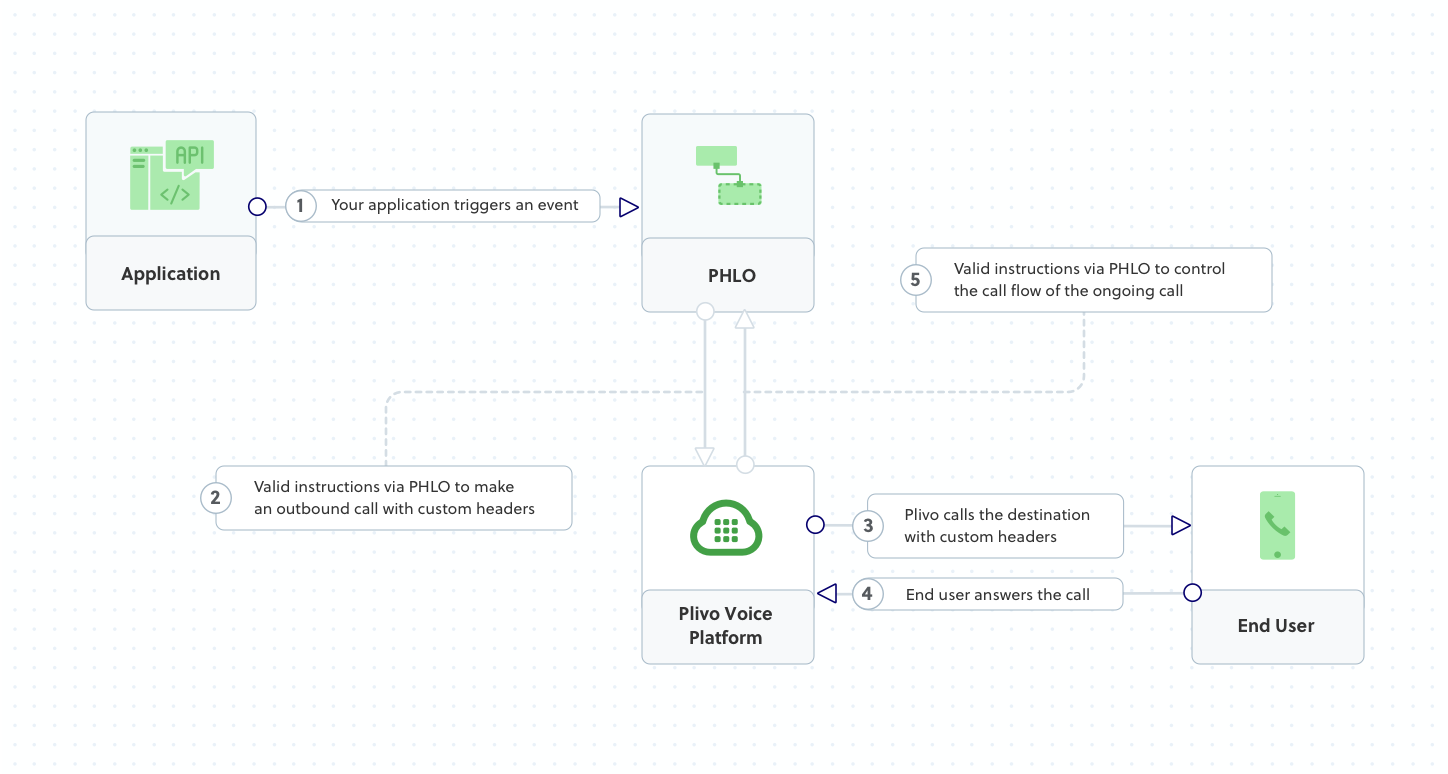
How it works
Copy
Ask AI
<Response>
<Speak>Congratulations! You've made your first outbound call!</Speak>
</Response>
Prerequisites
To get started, you need a Plivo account — sign up with your work email address if you don’t have one already. If this is your first time using Plivo APIs, follow our instructions to set up a Node.js development environment.Create the outbound call application with custom SIP headers
Create a file calledMakecall.js and paste into it this code.Copy
Ask AI
var plivo = require('plivo');

(function main() {
    'use strict';

   // If auth id and auth token are not specified, Plivo will fetch them from the environment variables.
    var client = new plivo.Client("<auth_id>","<auth_token>");
    client.calls.create(
        "<caller_id>", // from
        "<destination_number>", // to
        "https://s3.amazonaws.com/static.plivo.com/answer.xml", // answer url
        {
            answerMethod: "GET",
            sipHeaders: "Test=Sample"
        },
    ).then(function (response) {
        console.log(response);
    }, function (err) {
        console.error(err);
    });
})();
Note:
We recommend that you store your authentication credentials in the
auth_id and auth_token environment variables, to avoid the possibility of accidentally committing them to source control. If you do this, you can initialize the client with no arguments and it will automatically fetch them from the environment variables. You can use process.env to store environment variables and fetch them when initializing the client.Test
Save the file and run it.Copy
Ask AI
$ node Makecall.js
Sample response
Copy
Ask AI
(201, {
        u'message': u'call fired',
        u'request_uuid': u'85b1d45d-bc12-47f5-89c7-ae4a2c5d5713',
        u'api_id': u'ad0e27a8-9008-11e4-b932-22000ac50fac'
    }
)
Copy
Ask AI
/answer.xml?Direction=outbound&From=1111111111&ALegUUID=5260e820-958c-11e4-b6bf-498d468c930b&BillRate=0.00300&
To=sip%3Aabcd150105094929%40phone.plivo.com&`X-PH-Test=Sample`&CallUUID=5260e820-958c-11e4-b6bf-498d468c930b&ALegRequestUUID=2202d0ab-a890-4199-8582-e7a2615cb23b&
RequestUUID=2202d0ab-a890-4199-8582-e7a2615cb23b&SIP-H-To=%3Csip%3Aabcd150105094929%40phone.plivo.com%3E%3Btag%3D6U9J4.uVHI7KyEKSgD8vrPnAKQoR2QXc&
CallStatus=in-progress&Event=StartApp
Overview
SIP headers (also called SIP fields) are part of every HTTP request made by an outbound call. They can convey message attributes to ensure that information packets travel along the correct path between devices on different networks.SIP headers are categorized into four main types: record-route headers, route headers, via headers, and contact headers. They always have the formatCopy
Ask AI
<header_name>:<value>
X-PH-. Only characters [A-Z], [a-z], and [0-9] are allowed as part of either a SIP header name or value to ensure that you can encode them in a URL. You can use multiple header fields by entering them as a comma-separated list:Copy
Ask AI
head1=val1,head2=val2,head3=val3,...,headn=valn
- Using XML
Here’s how to use Plivo APIs and XML to make an outbound call with custom SIP headers.
How it works
Copy
Ask AI
<Response>
<Speak>Congratulations! You've made your first outbound call!</Speak>
</Response>
Prerequisites
To get started, you need a Plivo account — sign up with your work email address if you don’t have one already. If this is your first time using Plivo APIs, follow our instructions to set up a Ruby development environment.Create the outbound call application with custom SIP headers
Create a file calledmake_call.rb and paste into it this code.Copy
Ask AI
require 'rubygems'
require 'plivo'

include Plivo
include Plivo::Exceptions

api = RestClient.new("<auth_id>","<auth_token>")

begin
  response = api.calls.create(
    '<caller_id>',
    ['<destination_number>'],
    'https://s3.amazonaws.com/static.plivo.com/answer.xml',
    sip_headers: 'Test=Sample',)
  puts response
rescue PlivoRESTError => e
  puts 'Exception: ' + e.message
end
Note:
We recommend that you store your authentication credentials in the
auth_id and auth_token environment variables, to avoid the possibility of accidentally committing them to source control. If you do this, you can initialize the client with no arguments and it will automatically fetch them from the environment variables. You can use ENV to store environment variables and fetch them when initializing the client.Test
Save the file and run it.Copy
Ask AI
$ ruby make_call.rb
Sample response
Copy
Ask AI
(201, {
        u'message': u'call fired',
        u'request_uuid': u'85b1d45d-bc12-47f5-89c7-ae4a2c5d5713',
        u'api_id': u'ad0e27a8-9008-11e4-b932-22000ac50fac'
    }
)
Copy
Ask AI
/answer.xml?Direction=outbound&From=1111111111&ALegUUID=5260e820-958c-11e4-b6bf-498d468c930b&BillRate=0.00300&
To=sip%3Aabcd150105094929%40phone.plivo.com&`X-PH-Test=Sample`&CallUUID=5260e820-958c-11e4-b6bf-498d468c930b&ALegRequestUUID=2202d0ab-a890-4199-8582-e7a2615cb23b&
RequestUUID=2202d0ab-a890-4199-8582-e7a2615cb23b&SIP-H-To=%3Csip%3Aabcd150105094929%40phone.plivo.com%3E%3Btag%3D6U9J4.uVHI7KyEKSgD8vrPnAKQoR2QXc&
CallStatus=in-progress&Event=StartApp
Overview
SIP headers (also called SIP fields) are part of every HTTP request made by an outbound call. They can convey message attributes to ensure that information packets travel along the correct path between devices on different networks.SIP headers are categorized into four main types: record-route headers, route headers, via headers, and contact headers. They always have the formatCopy
Ask AI
<header_name>:<value>
X-PH-. Only characters [A-Z], [a-z], and [0-9] are allowed as part of either a SIP header name or value to ensure that you can encode them in a URL. You can use multiple header fields by entering them as a comma-separated list:Copy
Ask AI
head1=val1,head2=val2,head3=val3,...,headn=valn
- Using XML
Here’s how to use Plivo APIs and XML to make an outbound call with custom SIP headers.
How it works
Copy
Ask AI
<Response>
<Speak>Congratulations! You've made your first outbound call!</Speak>
</Response>
Prerequisites
To get started, you need a Plivo account — sign up with your work email address if you don’t have one already. If this is your first time using Plivo APIs, follow our instructions to set up a Python development environment.Create the outbound call application with custom SIP headers
Create a file calledmake_call.py and paste into it this code.Copy
Ask AI
import plivo

client = plivo.RestClient('<auth_id>','<auth_token>')
response = client.calls.create(
    from_='<caller_id>',
    to_='<destination_number>',
    answer_url='https://s3.amazonaws.com/static.plivo.com/answer.xml',
    answer_method='GET',
    sip_headers='Test=Sample')
print(response)
Note:
We recommend that you store your authentication credentials in the
auth_id and auth_token environment variables, to avoid the possibility of accidentally committing them to source control. If you do this, you can initialize the client with no arguments and it will automatically fetch them from the environment variables. You can use os module(os.environ) to store environment variables and fetch them when initializing the client.Test
Save the file and run it.Copy
Ask AI
$ python make_call.py
Sample response
Copy
Ask AI
(201, {
        u'message': u'call fired',
        u'request_uuid': u'85b1d45d-bc12-47f5-89c7-ae4a2c5d5713',
        u'api_id': u'ad0e27a8-9008-11e4-b932-22000ac50fac'
    }
)
Copy
Ask AI
/answer.xml?Direction=outbound&From=1111111111&ALegUUID=5260e820-958c-11e4-b6bf-498d468c930b&BillRate=0.00300&
To=sip%3Aabcd150105094929%40phone.plivo.com&`X-PH-Test=Sample`&CallUUID=5260e820-958c-11e4-b6bf-498d468c930b&ALegRequestUUID=2202d0ab-a890-4199-8582-e7a2615cb23b&
RequestUUID=2202d0ab-a890-4199-8582-e7a2615cb23b&SIP-H-To=%3Csip%3Aabcd150105094929%40phone.plivo.com%3E%3Btag%3D6U9J4.uVHI7KyEKSgD8vrPnAKQoR2QXc&
CallStatus=in-progress&Event=StartApp
Overview
SIP headers (also called SIP fields) are part of every HTTP request made by an outbound call. They can convey message attributes to ensure that information packets travel along the correct path between devices on different networks.SIP headers are categorized into four main types: record-route headers, route headers, via headers, and contact headers. They always have the formatCopy
Ask AI
<header_name>:<value>
X-PH-. Only characters [A-Z], [a-z], and [0-9] are allowed as part of either a SIP header name or value to ensure that you can encode them in a URL. You can use multiple header fields by entering them as a comma-separated list:Copy
Ask AI
head1=val1,head2=val2,head3=val3,...,headn=valn
- Using XML
Here’s how to use Plivo APIs and XML to make an outbound call with custom SIP headers.
How it works
Copy
Ask AI
<Response>
<Speak>Congratulations! You've made your first outbound call!</Speak>
</Response>
Prerequisites
To get started, you need a Plivo account — sign up with your work email address if you don’t have one already. If this is your first time using Plivo APIs, follow our instructions to set up a PHP development environment.Create the outbound call application with custom SIP headers
Create a file calledMakeCall.php and paste into it this code:Copy
Ask AI
<?php
require 'vendor/autoload.php';
use Plivo\RestClient;
use Plivo\Exceptions\PlivoRestException;
$client = new RestClient("<auth_id>","<auth_token>");
try {
    $response = $client->calls->create(
        '<caller_id>',
        ['<destination_number>'],
        'https://s3.amazonaws.com/static.plivo.com/answer.xml',
        [
            'ring_url' => 'https://WWW.RING.URL',
            'sip_headers' => 'Test=Sample',
            'answer_method' => 'GET'
        ]
    );
    print_r($response);
}
catch (PlivoRestException $ex) {
    print_r($ex);
}
Note:
We recommend that you store your authentication credentials in the
auth_id and auth_token environment variables, to avoid the possibility of accidentally committing them to source control. If you do this, you can initialize the client with no arguments and it will automatically fetch them from the environment variables. You can use the $_ENV or putenv/getenv functions to store environment variables and fetch them when initializing the client.Test
Save the file and run it.Copy
Ask AI
$ php MakeCall.php
Sample response
Copy
Ask AI
(201, {
        u'message': u'call fired',
        u'request_uuid': u'85b1d45d-bc12-47f5-89c7-ae4a2c5d5713',
        u'api_id': u'ad0e27a8-9008-11e4-b932-22000ac50fac'
    }
)
Copy
Ask AI
/answer.xml?Direction=outbound&From=1111111111&ALegUUID=5260e820-958c-11e4-b6bf-498d468c930b&BillRate=0.00300&
To=sip%3Aabcd150105094929%40phone.plivo.com&`X-PH-Test=Sample`&CallUUID=5260e820-958c-11e4-b6bf-498d468c930b&ALegRequestUUID=2202d0ab-a890-4199-8582-e7a2615cb23b&
RequestUUID=2202d0ab-a890-4199-8582-e7a2615cb23b&SIP-H-To=%3Csip%3Aabcd150105094929%40phone.plivo.com%3E%3Btag%3D6U9J4.uVHI7KyEKSgD8vrPnAKQoR2QXc&
CallStatus=in-progress&Event=StartApp
Overview
SIP headers (also called SIP fields) are part of every HTTP request made by an outbound call. They can convey message attributes to ensure that information packets travel along the correct path between devices on different networks.SIP headers are categorized into four main types: record-route headers, route headers, via headers, and contact headers. They always have the formatCopy
Ask AI
<header_name>:<value>
X-PH-. Only characters [A-Z], [a-z], and [0-9] are allowed as part of either a SIP header name or value to ensure that you can encode them in a URL. You can use multiple header fields by entering them as a comma-separated list:Copy
Ask AI
head1=val1,head2=val2,head3=val3,...,headn=valn
- Using XML
Here’s how to use Plivo APIs and XML to make an outbound call with custom SIP headers.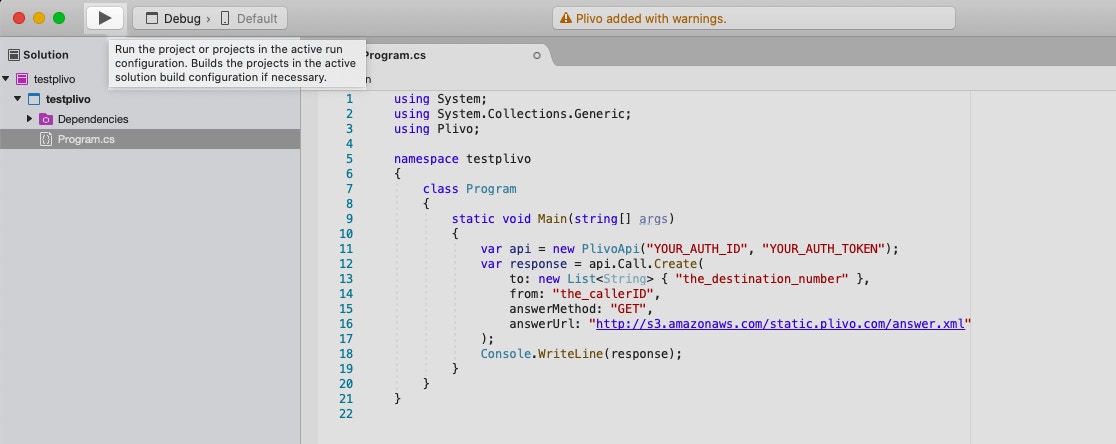
How it works
Copy
Ask AI
<Response>
<Speak>Congratulations! You've made your first outbound call!</Speak>
</Response>
Prerequisites
To get started, you need a Plivo account — sign up with your work email address if you don’t have one already. If this is your first time using Plivo APIs, follow our instructions to set up a .NET development environment.Create the outbound call application with custom SIP headers
Open the file in the CS project calledProgram.cs and paste into it this code.Copy
Ask AI
 using System;
 using System.Collections.Generic;
 using Plivo;
 using Plivo.Exception;

namespace PlivoExamples
{
    internal class Program
    {
        public static void Main(string[] args)
        {
            var api = new PlivoApi("<auth_id>","<auth_token>");
            try
            {
                var response = api.Call.Create(
                    to:new List<String>{"<destination_number>"},
                    from:"<caller_id>",
                    answerMethod:"GET",
                    answerUrl:"https://s3.amazonaws.com/static.plivo.com/answer.xml",
                    sipHeaders: "customer=johndoe"
                );
                Console.WriteLine(response);
            }
            catch (PlivoRestException e)
            {
                Console.WriteLine("Exception: " + e.Message);
            }
        }
    }
}
Note:
We recommend that you store your authentication credentials in the
auth_id and auth_token environment variables, to avoid the possibility of accidentally committing them to source control. If you do this, you can initialize the client with no arguments and it will automatically fetch them from the environment variables. You can use <a href="https://docs.microsoft.com/en-us/dotnet/api/system.environment.setenvironmentvariable?view=netcore-3.1" rel="nofollow">Environment.SetEnvironmentVariable Method</a> to store environment variables and fetch them using <a href="https://docs.microsoft.com/en-us/dotnet/api/system.environment.getenvironmentvariable?view=netcore-3.1" rel="nofollow">Environment.GetEnvironmentVariable Method</a> when initializing the client.Test
Save the file and run it.Sample response
Copy
Ask AI
(201, {
        u'message': u'call fired',
        u'request_uuid': u'85b1d45d-bc12-47f5-89c7-ae4a2c5d5713',
        u'api_id': u'ad0e27a8-9008-11e4-b932-22000ac50fac'
    }
)
Copy
Ask AI
/answer.xml?Direction=outbound&From=1111111111&ALegUUID=5260e820-958c-11e4-b6bf-498d468c930b&BillRate=0.00300&
To=sip%3Aabcd150105094929%40phone.plivo.com&`X-PH-Test=Sample`&CallUUID=5260e820-958c-11e4-b6bf-498d468c930b&ALegRequestUUID=2202d0ab-a890-4199-8582-e7a2615cb23b&
RequestUUID=2202d0ab-a890-4199-8582-e7a2615cb23b&SIP-H-To=%3Csip%3Aabcd150105094929%40phone.plivo.com%3E%3Btag%3D6U9J4.uVHI7KyEKSgD8vrPnAKQoR2QXc&
CallStatus=in-progress&Event=StartApp
Overview
SIP headers (also called SIP fields) are part of every HTTP request made by an outbound call. They can convey message attributes to ensure that information packets travel along the correct path between devices on different networks.SIP headers are categorized into four main types: record-route headers, route headers, via headers, and contact headers. They always have the formatCopy
Ask AI
<header_name>:<value>
X-PH-. Only characters [A-Z], [a-z], and [0-9] are allowed as part of either a SIP header name or value to ensure that you can encode them in a URL. You can use multiple header fields by entering them as a comma-separated list:Copy
Ask AI
head1=val1,head2=val2,head3=val3,...,headn=valn
- Using XML
Here’s how to use Plivo APIs and XML to make an outbound call with custom SIP headers.
How it works
Copy
Ask AI
<Response>
<Speak>Congratulations! You've made your first outbound call!</Speak>
</Response>
Prerequisites
To get started, you need a Plivo account — sign up with your work email address if you don’t have one already. If this is your first time using Plivo APIs, follow our instructions to set up a Java development environment.Create the outbound call application with custom SIP headers
Create a Java class in the project calledMakeCall and paste into it this code.Copy
Ask AI
package com.plivo.api.samples.call;

import java.io.IOException;
import java.util.Collections;

import com.plivo.api.Plivo;
import com.plivo.api.exceptions.PlivoRestException;
import com.plivo.api.models.call.Call;
import com.plivo.api.models.call.CallCreateResponse;

class CallCreate {
    public static void main(String [] args) {
        Plivo.init("<auth_id>","<auth_token>");
        try {
            CallCreateResponse response = Call.creator("<caller_id>", Collections.singletonList("<destination_number>"), "https://s3.amazonaws.com/static.plivo.com/answer.xml")
                    .answerMethod("GET")
                    .sipHeaders(new HashMap<String, String>() )
                    .create();

            System.out.println(response);
        } catch (PlivoRestException | IOException e) {
            e.printStackTrace();
        }
    }
}
Note:
We recommend that you store your authentication credentials in the
auth_id and auth_token environment variables, to avoid the possibility of accidentally committing them to source control. If you do this, you can initialize the client with no arguments and it will automatically fetch them from the environment variables. You can use <a rel="nofollow" href="https://docs.oracle.com/javase/tutorial/essential/environment/env.html">System.getenv()</a> to store and retrieve environment variables when initializing the client.Test
Save the file and run it.Sample response
Copy
Ask AI
(201, {
        u'message': u'call fired',
        u'request_uuid': u'85b1d45d-bc12-47f5-89c7-ae4a2c5d5713',
        u'api_id': u'ad0e27a8-9008-11e4-b932-22000ac50fac'
    }
)
Copy
Ask AI
/answer.xml?Direction=outbound&From=1111111111&ALegUUID=5260e820-958c-11e4-b6bf-498d468c930b&BillRate=0.00300&
To=sip%3Aabcd150105094929%40phone.plivo.com&`X-PH-Test=Sample`&CallUUID=5260e820-958c-11e4-b6bf-498d468c930b&ALegRequestUUID=2202d0ab-a890-4199-8582-e7a2615cb23b&
RequestUUID=2202d0ab-a890-4199-8582-e7a2615cb23b&SIP-H-To=%3Csip%3Aabcd150105094929%40phone.plivo.com%3E%3Btag%3D6U9J4.uVHI7KyEKSgD8vrPnAKQoR2QXc&
CallStatus=in-progress&Event=StartApp
Overview
SIP headers (also called SIP fields) are part of every HTTP request made by an outbound call. They can convey message attributes to ensure that information packets travel along the correct path between devices on different networks.SIP headers are categorized into four main types: record-route headers, route headers, via headers, and contact headers. They always have the formatCopy
Ask AI
<header_name>:<value>
X-PH-. Only characters [A-Z], [a-z], and [0-9] are allowed as part of either a SIP header name or value to ensure that you can encode them in a URL. You can use multiple header fields by entering them as a comma-separated list:Copy
Ask AI
head1=val1,head2=val2,head3=val3,...,headn=valn
- Using XML
Here’s how to use Plivo APIs and XML to make an outbound call with custom SIP headers.
How it works
Copy
Ask AI
<Response>
<Speak>Congratulations! You've made your first outbound call!</Speak>
</Response>
Prerequisites
To get started, you need a Plivo account — sign up with your work email address if you don’t have one already. If this is your first time using Plivo APIs, follow our instructions to set up a Go development environment.Create the outbound call application with custom SIP headers
Create a file calledMakeCall.go and paste into it this code:Copy
Ask AI
package main

import "fmt"
import "github.com/plivo/plivo-go/v7"

func main() {
	client, err := plivo.NewClient("<auth_id>","<auth_token>", &plivo.ClientOptions{})
	if err != nil {
			fmt.Print("Error", err.Error())
			return
		}
	response, err := client.Calls.Create(
		plivo.CallCreateParams{
			From: "<caller_id>",
			To: "<destination_number>",
			AnswerURL: "https://s3.amazonaws.com/static.plivo.com/answer.xml",
			AnswerMethod: "GET",
			SipHeader: "customer=johndoe"
		},
	)
	if err != nil {
			fmt.Print("Error", err.Error())
			return
		}
	fmt.Printf("Response: %#v\n", response)
}
Note:
We recommend that you store your authentication credentials in the
auth_id and auth_token environment variables, to avoid the possibility of accidentally committing them to source control. If you do this, you can initialize the client with no arguments and it will automatically fetch them from the environment variables. You can use os.Setenv and os.Getenv functions to store environment variables and fetch them when initializing the client.Test
Save the file and run it.Copy
Ask AI
go run MakeCall.go
Sample response
Copy
Ask AI
(201, {
        u'message': u'call fired',
        u'request_uuid': u'85b1d45d-bc12-47f5-89c7-ae4a2c5d5713',
        u'api_id': u'ad0e27a8-9008-11e4-b932-22000ac50fac'
    }
)
Copy
Ask AI
/answer.xml?Direction=outbound&From=1111111111&ALegUUID=5260e820-958c-11e4-b6bf-498d468c930b&BillRate=0.00300&
To=sip%3Aabcd150105094929%40phone.plivo.com&`X-PH-Test=Sample`&CallUUID=5260e820-958c-11e4-b6bf-498d468c930b&ALegRequestUUID=2202d0ab-a890-4199-8582-e7a2615cb23b&
RequestUUID=2202d0ab-a890-4199-8582-e7a2615cb23b&SIP-H-To=%3Csip%3Aabcd150105094929%40phone.plivo.com%3E%3Btag%3D6U9J4.uVHI7KyEKSgD8vrPnAKQoR2QXc&
CallStatus=in-progress&Event=StartApp