

- Node
- Ruby
- Python
- PHP
- .NET
- Java
- Go
Overview
This guide shows how to make an outgoing call and greet the call recipient with a text-to-speech message when they answer. Use cases such as voice notifications and alerts, voice surveys, and, voice one-time passwords involve outbound calls as part of their call flow.You can start making and receiving calls either by using our PHLO visual workflow builder or our APIs and XML documents. Follow the instructions in one of the tabs below.- Using XML
Here’s how to use Plivo APIs and XML to make an outbound call and leave a text-to-speech message when the recipient answers the call.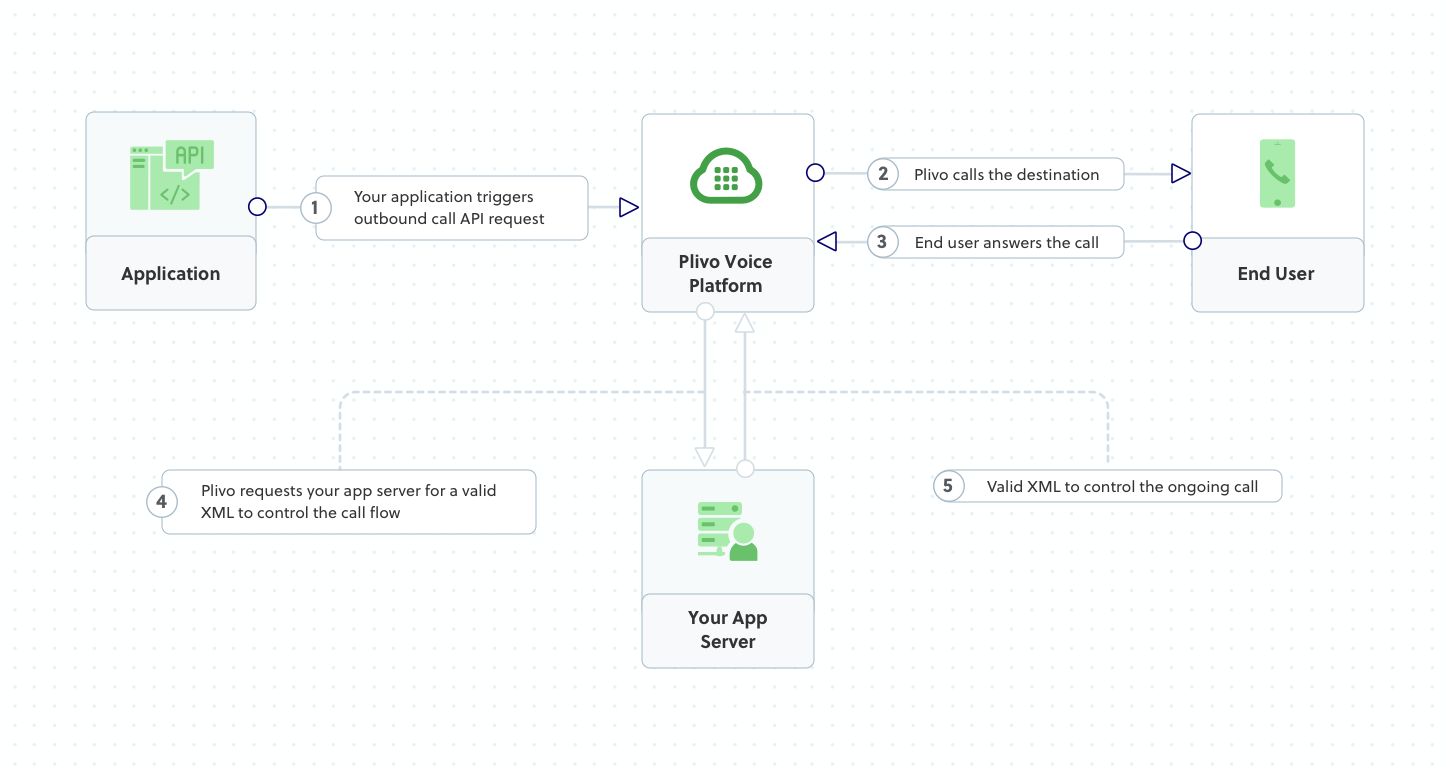
How it works
Copy
Ask AI
<Response>
<Speak>Congratulations! You've made your first outbound call!</Speak>
</Response>
Prerequisites
To get started, you need a Plivo account — sign up with your work email address if you don’t have one already. You can also follow our instructions to set up a Node.js development environment.Make an outbound call
Create a file calledMakecall.js and paste into it this code.Copy
Ask AI
var plivo = require('plivo');

(function main() {
    'use strict';

    var client = new plivo.Client("<auth_id>","<auth_token>");
    client.calls.create(
        "<caller_id>", // from
        "<destination_number>", // to
        "https://s3.amazonaws.com/static.plivo.com/answer.xml", // answer url
        {
            answerMethod: "GET",
        },
    ).then(function (response) {
        console.log(response);
    }, function (err) {
        console.error(err);
    });
})();
Test
Save the file and run it.Copy
Ask AI
$ node Makecall.js
Overview
This guide shows how to make an outgoing call and greet the call recipient with a text-to-speech message when they answer. Use cases such as voice notifications and alerts, voice surveys, and, voice one-time passwords involve outbound calls as part of their call flow.You can start making and receiving calls either by using our PHLO visual workflow builder or our APIs and XML documents. Follow the instructions in one of the tabs below.- Using XML
Here’s how to use Plivo APIs and XML to make an outbound call and leave a text-to-speech message when the recipient answers the call.
How it works
Copy
Ask AI
<Response>
<Speak>Congratulations! You've made your first outbound call!</Speak>
</Response>
Prerequisites
To get started, you need a Plivo account — sign up with your work email address if you don’t have one already. You can also follow our instructions to set up a Ruby development environment.Make an outbound call
Create a file calledmake_call.rb and paste into it this code.Copy
Ask AI
require 'rubygems'
require 'plivo'

include Plivo
include Plivo::Exceptions

api = RestClient.new("<auth_id>","<auth_token>")

begin
  response = api.calls.create(
    '+12025550000',
    ['+12025551111'],
    'https://s3.amazonaws.com/static.plivo.com/answer.xml',
     {
            answer_method: "GET",
     },
  )
  puts response
rescue PlivoRESTError => e
  puts 'Exception: ' + e.message
end
Test
Save the file and run it.Copy
Ask AI
$ ruby make_call.rb
Overview
This guide shows how to make an outgoing call and greet the call recipient with a text-to-speech message when they answer. Use cases such as voice notifications and alerts, voice surveys, and, voice one-time passwords involve outbound calls as part of their call flow.You can start making and receiving calls either by using our PHLO visual workflow builder or our APIs and XML documents. Follow the instructions in one of the tabs below.- Using XML
Here’s how to use Plivo APIs and XML to make an outbound call and leave a text-to-speech message when the recipient answers the call.
How it works
Copy
Ask AI
<Response>
<Speak>Congratulations! You've made your first outbound call!</Speak>
</Response>
Prerequisites
To get started, you need a Plivo account — sign up with your work email address if you don’t have one already. You can also follow our instructions to set up a Python development environment.Make an outbound call
Create a file calledmake_call.py and paste into it this code.Copy
Ask AI
import plivo

client = plivo.RestClient('<auth_id>','<auth_token>')
response = client.calls.create(
    from_='<caller_id>',
    to_='<destination_number>',
    answer_url='https://s3.amazonaws.com/static.plivo.com/answer.xml',
    answer_method='GET', )
print(response)
Test
Save the file and run it.Copy
Ask AI
$ python make_call.py
Overview
This guide shows how to make an outgoing call and greet the call recipient with a text-to-speech message when they answer. Use cases such as voice notifications and alerts, voice surveys, and, voice one-time passwords involve outbound calls as part of their call flow.You can start making and receiving calls either by using our PHLO visual workflow builder or our APIs and XML documents. Follow the instructions in one of the tabs below.- Using XML
Here’s how to use Plivo APIs and XML to make an outbound call and leave a text-to-speech message when the recipient answers the call.
How it works
Copy
Ask AI
<Response>
<Speak>Congratulations! You've made your first outbound call!</Speak>
</Response>
Prerequisites
To get started, you need a Plivo account — sign up with your work email address if you don’t have one already. You can also follow our instructions to set up a PHP development environment.Make an outbound call
Create a file calledMakeCall.php and paste into it this code:Copy
Ask AI
<?php
require 'vendor/autoload.php';
use Plivo\RestClient;

$auth_id    = "<auth_id>";
$auth_token = "<auth_token>";
$p          = new RestClient($auth_id, $auth_token);

$response = $client->calls->create('<caller_id>',
                                 ['<destination_number>'],
                                 'https://s3.amazonaws.com/static.plivo.com/answer.xml',);
print_r($response);
Test
Save the file and run it.Copy
Ask AI
$ php MakeCall.php
Overview
This guide shows how to make an outgoing call and greet the call recipient with a text-to-speech message when they answer. Use cases such as voice notifications and alerts, voice surveys, and, voice one-time passwords involve outbound calls as part of their call flow.You can start making and receiving calls either by using our PHLO visual workflow builder or our APIs and XML documents. Follow the instructions in one of the tabs below.- Using XML
Here’s how to use Plivo APIs and XML to make an outbound call and leave a text-to-speech message when the recipient answers the call.
How it works
Copy
Ask AI
<Response>
<Speak>Congratulations! You've made your first outbound call!</Speak>
</Response>
Prerequisites
To get started, you need a Plivo account — sign up with your work email address if you don’t have one already. You can also follow our instructions to set up a .NET development environment.Make an outbound call
In Visual Studio, in the CS project, open the fileProgram.cs and paste into it this code.Copy
Ask AI
using System;
using System.Collections.Generic;
using Plivo;

namespace testplivo
{
    class Program
    {
        static void Main(string[] args)
        {
÷            var api = new PlivoApi("<auth_id>","<auth_token>");
            var response = api.Call.Create(
                to: new List<String> { "<destination_number>" },
                from: "<caller_id>",
                answerMethod: "GET",
                answerUrl: "https://s3.amazonaws.com/static.plivo.com/answer.xml"
            );
            Console.WriteLine(response);
        }
    }
}
Test
Save the file and run it.Overview
This guide shows how to make an outgoing call and greet the call recipient with a text-to-speech message when they answer. Use cases such as voice notifications and alerts, voice surveys, and, voice one-time passwords involve outbound calls as part of their call flow.You can start making and receiving calls either by using our PHLO visual workflow builder or our APIs and XML documents. Follow the instructions in one of the tabs below.- Using XML
Here’s how to use Plivo APIs and XML to make an outbound call and leave a text-to-speech message when the recipient answers the call.
How it works
Copy
Ask AI
<Response>
<Speak>Congratulations! You've made your first outbound call!</Speak>
</Response>
Prerequisites
To get started, you need a Plivo account — sign up with your work email address if you don’t have one already. You can also follow our instructions to set up a Java development environment.Make an outbound call
Create a Java class in the projectMakeCall and paste into it this code.Copy
Ask AI
import java.io.IOException;
import java.util.Collections;
import com.plivo.api.Plivo;
import com.plivo.api.exceptions.PlivoRestException;
import com.plivo.api.models.call.Call;
import com.plivo.api.models.call.CallCreateResponse;

class MakeCall {
    public static void main(String [] args) throws IOException, PlivoRestException {
        Plivo.init("<auth_id>","<auth_token>");
        CallCreateResponse response = Call.creator("<caller_id>",
                Collections.singletonList("<destination_number>"),
                "https://s3.amazonaws.com/static.plivo.com/answer.xml")
                .answerMethod("GET")
                .create();
        System.out.println(response);
    }
}
Test
Save the file and run it.Overview
This guide shows how to make an outgoing call and greet the call recipient with a text-to-speech message when they answer. Use cases such as voice notifications and alerts, voice surveys, and, voice one-time passwords involve outbound calls as part of their call flow.You can start making and receiving calls either by using our PHLO visual workflow builder or our APIs and XML documents. Follow the instructions in one of the tabs below.- Using XML
Here’s how to use Plivo APIs and XML to make an outbound call and leave a text-to-speech message when the recipient answers the call.
How it works
Copy
Ask AI
<Response>
<Speak>Congratulations! You've made your first outbound call!</Speak>
</Response>
Prerequisites
To get started, you need a Plivo account — sign up with your work email address if you don’t have one already. You can also follow our instructions to set up a Go development environment.Make an outbound call
Create a file calledMakeCall.go and paste into it this code:Copy
Ask AI
package main

import "fmt"
import "github.com/plivo/plivo-go/v7"

func main() {
	client, err := plivo.NewClient("<auth_id>","<auth_token>", &plivo.ClientOptions{})
	if err != nil {
			fmt.Print("Error", err.Error())
			return
		}
	response, err := client.Calls.Create(
		plivo.CallCreateParams{
			From: "<caller_id>",
			To: "<destination_number>",
			AnswerURL: "https://s3.amazonaws.com/static.plivo.com/answer.xml",
			AnswerMethod: "GET",
		},
	)
	if err != nil {
			fmt.Print("Error", err.Error())
			return
		}
	fmt.Printf("Response: %#v\n", response)
}
Test
Save the file and run it.Copy
Ask AI
go run MakeCall.go