

- Node
- Ruby
- Python
- PHP
- .NET
- Java
- Go
Overview
Plivo lets you automate voice surveys for use cases such as collecting feedback from customers and conducting polling on political issues. You can set up multiple levels of questions and walk users through different paths depending on the keys they press in response to your questions, and save the responses for analysis.You can implement voice surveys either by using our PHLO visual workflow builder or our APIs and XML documents. Follow the instructions in one of the tabs below.- Using XML
Here’s how to use Plivo APIs and XML to implement voice surveys.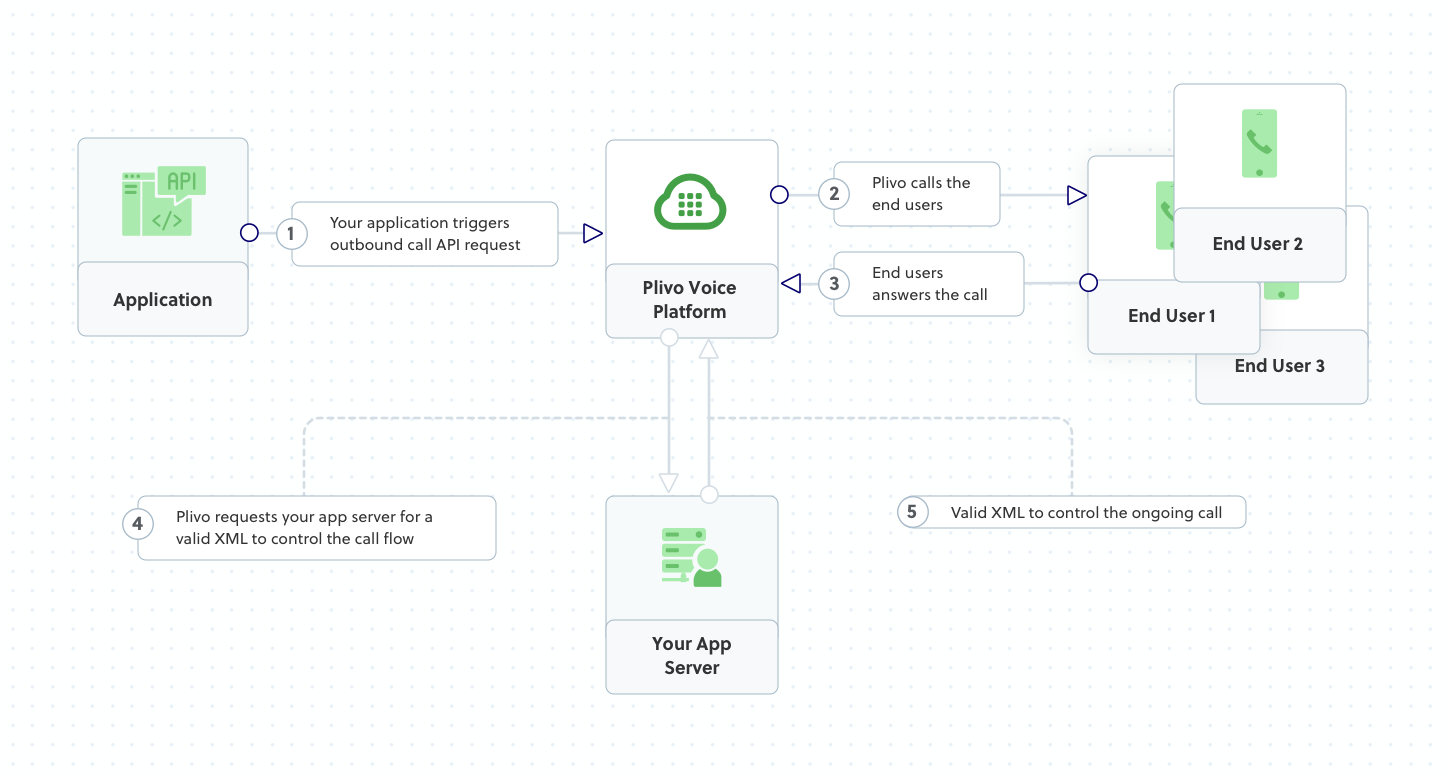
How it works
Prerequisites
To get started, you need a Plivo account — sign up with your work email address if you don’t have one already. You must have a voice-enabled Plivo phone number to receive incoming calls; you can rent numbers from the Numbers page of the Plivo console, or by using the Numbers API. If this is your first time using Plivo APIs, follow our instructions to set up a PHP development environment and a web server and safely expose that server to the internet.Create a voice survey application in PHP
Change to the project directory and run this command to create a Laravel controller.Copy
Ask AI
$ php artisan make:controller SurveyController
Copy
Ask AI
<?php

namespace App\Http\Controllers;
require '../../vendor/autoload.php';
use Plivo\RestClient;
use Plivo\XML\Response;
use Illuminate\Http\Request;

class SurveyController extends Controller
{
    // GetInput XML to handle the incoming call
    public function ivrMain()
    {
        // Message that Plivo reads when the call recipient answers
        $Question1 = "Hi, this is a call from Plivo. How would you rate your overall satisfaction with our services? Press 1 if you're satisfied or 2 to suggest improvements";
        // Message that Plivo reads when the recipient provides negative feedback
        $NegativeFeedback = "We're sorry about your bad experience, One of our representatives will get in touch with you";
        // Message that Plivo reads when the caller does nothing
        $NoinputMessage = "Sorry, I didn't catch that. Please hang up and try again";
        // Message that Plivo reads when the caller enters an invalid number
        $WronginputMessage = "Sorry, that's not a valid entry";

        $r = new Response();

        $getinput_action_url = "https://<yourdomain>.com/firstbranch.php";
        $get_input = $r->addGetInput([
                    'action' => $getinput_action_url,
                    'method' => "POST",
                    'digitEndTimeout' => "5",
                    'inputType' => "dtmf",
                    'redirect' => "true",
                ]);
        $get_input->addSpeak($Question1);
        $r->addSpeak($NoinputMessage);
        Header('Content-type: text/xml');
        echo $r->toXML();
    }

    // Action URL block for DTMF
    public function firstBranch(Request $request)
    {
        $Question2 = "How would you rate your satisfaction with our customer service? Press 1 if you're satisfied or 2 to suggest improvements";
        // Message that Plivo reads when the recipient provides negative feedback
        $NegativeFeedback = "We're sorry about your bad experience, One of our representatives will get in touch with you";
        // Message that Plivo reads when the caller does nothing
        $NoinputMessage = "Sorry, I didn't catch that. Please hang up and try again";
        // Message that Plivo reads when the caller enters an invalid number
        $WronginputMessage = "Sorry, that's not a valid entry";

        $r = new Response();

        $digit = $_REQUEST['Digits'];
        if ($digit == '1'){
            $getinput_action_url = "https://<yourdomain>.com/secondbranch.php";
            $get_input = $r->addGetInput([
                    'action' => $getinput_action_url,
                    'method' => "POST",
                    'digitEndTimeout' => "5",
                    'inputType' => "dtmf",
                    'redirect' => "true",
                ]);
            $get_input->addSpeak($Question2);
            $r->addSpeak($NoinputMessage);
        }
        else if ($digit == '2'){
            $r->addSpeak($NegativeFeedback);
        }
        else {
            $r->addSpeak($WronginputMessage);
        }
        Header('Content-type: text/xml');
        echo $r->toXML();
    }

    // Action URL block for Sales and Support branch
    public function secondBranch(Request $request)
    {
        // Message that Plivo reads when the recipient provides negative feedback
        $NegativeFeedback = "We're sorry about your bad experience, One of our representatives will get in touch with you";
        // Message that Plivo reads when the caller enters a wrong number
        $WronginputMessage = "Sorry, that's not a valid entry";

        $r = new Response();
        $digit = $_REQUEST['Digits'];
        if ($digit == '1'){
            $body = "Thank you for participating in the survey";
            $params = array(
                'language' => "en-GB"
            );
            $r->addSpeak($body,$params);
        }
        else if ($digit == '2'){
            $r->addSpeak($NegativeFeedback);
        }
        else {
            $r->addSpeak($WronginputMessage);
        }
        Header('Content-type: text/xml');
        echo $r->toXML();
    }
}
Note:
We recommend that you store your credentials in the
auth_id and auth_token environment variables, to avoid the possibility of accidentally committing them to source control. If you do this, you can initialize the client with no arguments and Plivo will automatically fetch them from the environment variables. You can use $_ENV or putenv/getenv functions to store environment variables and fetch them when initializing the client.Add a route
Add a route for the forward function in the SurveyController class. Edit routes/web.php and add these lines.Copy
Ask AI
Route::match(['get', 'post'], '/survey', 'SurveyController@ivrMain');
Route::match(['get', 'post'], '/firstbranch', 'SurveyController@firstBranch');
Route::match(['get', 'post'], '/secondbranch', 'SurveyController@secondBranch');
Copy
Ask AI
$ php artisan serve
Test
Make a call to a Plivo phone number and see how the survey application works.Overview
Plivo lets you automate voice surveys for use cases such as collecting feedback from customers and conducting polling on political issues. You can set up multiple levels of questions and walk users through different paths depending on the keys they press in response to your questions, and save the responses for analysis.You can implement voice surveys either by using our PHLO visual workflow builder or our APIs and XML documents. Follow the instructions in one of the tabs below.- Using XML
Here’s how to use Plivo APIs and XML to implement voice surveys.This generates a controller named plivo_controller in the app/controllers/ directory and a respective view in app/views/plivo. We can delete the view as we will not need it.Edit app/controllers/plivo_controller.rb and add this code in the PlivoController class.Replace the auth placeholders with your authentication credentials from the Plivo console. Replace the phone number placeholders with actual phone numbers in E.164 format (for example, +12025551234).Start the Rails server.You should see your basic server application in action at http://localhost:3000/plivo/survey/.Set up ngrok to expose your local server to the internet.
Create a voice survey application in Ruby
Change to the project directory and run this command to create a Rails controller.Copy
Ask AI
$ rails generate controller Plivo voice
Copy
Ask AI
$ rm app/views/plivo/voice.html.erb
Copy
Ask AI
include Plivo
include Plivo::XML
include Plivo::Exceptions

class PlivoController < ApplicationController
  # Message that Plivo reads when the call recipient answers
  $question1 = "Hi, this is a call from Plivo. How would you rate your overall satisfaction with our services? Press 1 if you're satisfied or 2 to suggest improvements"
  $question2 = "How would you rate your satisfaction with our customer service? Press 1 if you're satisfied or 2 to suggest improvements"
  # Message that Plivo reads when the recipient provides negative feedback
  $negative_feedback = "We're sorry about your bad experience. One of our representatives will get in touch with you"
  # Message that Plivo reads when the caller does nothing
  $noinput_message = "Sorry, I didn't catch that. Please hang up and try again"
  # This is the message that Plivo reads when the caller inputs a wrong number.
  $wronginput_message = "Sorry, that's not a valid entry"
  def survey
    r = Response.new()

    getinput_action_url = "https://<yourdomain>.com/ivr/firstbranch/"
    params = {
        action: getinput_action_url,
        method: 'POST',
        digitEndTimeout: '5',
        inputType:'dtmf',
        redirect:'true'
    }
    getinput = r.addGetInput(params)
    getinput.addSpeak($question1)
    r.addSpeak($noinput_message)

    xml = PlivoXML.new(r)
    render xml: xml.to_xml
  end
  def firstbranch
    digit = params[:Digits]
    r = Response.new()

    if (digit == "1")
        getinput_action_url = "https://<yourdomain>.com/ivr/secondbranch/"
        params = {
            action: getinput_action_url,
            method: 'POST',
            digitEndTimeout: '5',
            inputType:'dtmf',
            redirect:'true'
        }
        getinput = r.addGetInput(params)
        getinput.addSpeak($question2)
        r.addSpeak($noinput_message)

    elsif (digit == "2")
        r.addSpeak($negative_feedback)
    else
        r.addSpeak($wronginput_message)
    end

    xml = PlivoXML.new(r)
    render xml: xml.to_xml
  end
  def secondbranch
    digit = params[:Digits]

    r = Response.new()

    if (digit == "1")
        body = "Thank you for participating in the survey"
        params = {
            'language'=> "en-GB"
        }

        r.addSpeak(body,params)
    elsif (digit == "2")
        r.addSpeak($negative_feedback)
    else
        r.addSpeak($wronginput_message)
    end

    xml = PlivoXML.new(r)
    render xml: xml.to_xml
  end
end
Note: We recommend that you store your credentials in the
auth_id and auth_token environment variables, to avoid the possibility of accidentally committing them to source control. If you do this, you can initialize the client with no arguments and Plivo will automatically fetch the values from the environment variables. You can use ENV to store environment variables and fetch them when initializing the client.Add a route
Add a route for the inbound function in the PlivoController class. Edit config/routes.rb and add these lines after the inbound route.Copy
Ask AI
get 'plivo/survey'
get 'plivo/firstbranch'
get 'plivo/secondbranch'
Copy
Ask AI
$ rails server
Test
Make a call to a Plivo phone number and see how the survey application works.Overview
Plivo lets you automate voice surveys for use cases such as collecting feedback from customers and conducting polling on political issues. You can set up multiple levels of questions and walk users through different paths depending on the keys they press in response to your questions, and save the responses for analysis.You can implement voice surveys either by using our PHLO visual workflow builder or our APIs and XML documents. Follow the instructions in one of the tabs below.- Using XML
Here’s how to use Plivo APIs and XML to implement voice surveys.
How it works
Prerequisites
To get started, you need a Plivo account — sign up with your work email address if you don’t have one already. You must have a voice-enabled Plivo phone number to receive incoming calls; you can rent numbers from the Numbers page of the Plivo console, or by using the Numbers API. If this is your first time using Plivo APIs, follow our instructions to set up a Python development environment and a web server and safely expose that server to the internet.Create a voice survey application in PHP
Create a file calledsurvey.py and paste into it this code.Copy
Ask AI
# -*- coding: utf-8 -*-
from flask import Flask, Response, request, url_for
from plivo import plivoxml

# Message that Plivo reads when the call recipient answers
question1 = "Hi, this is a call from Plivo. How would you rate your overall satisfaction with our services? Press 1 if you're satisfied or 2 to suggest improvements"
question2 = "How would you rate your satisfaction with our customer service? Press 1 if you're satisfied or 2 to suggest improvements"
# Message that Plivo reads when the recipient provides negative feedback
negative_feedback = "We're sorry about your bad experience, One of our representatives will get in touch with you"
# Message that Plivo reads when the caller does nothing
noinput_message = "Sorry, I didn't catch that. Please hang up and try again"
# Message that Plivo reads when the caller enters an invalid number
wronginput_message = "Sorry, that's not a valid entry"

app = Flask(__name__)

@app.route('/survey/', methods=['GET','POST'])
def ivr():
    response = plivoxml.ResponseElement()
    getinput_action_url = "https://<yourdomain>.com/firstbranch/"
    response.add(plivoxml.GetInputElement().
        set_action(getinput_action_url).
        set_method('POST').
        set_input_type('dtmf').
        set_digit_end_timeout(5).
        set_redirect(True).add(
            plivoxml.SpeakElement(question1)))
    response.add(plivoxml.SpeakElement(noinput_message))
    return Response(response.to_string(), mimetype='application/xml')

@app.route('/survey/firstbranch/', methods=['GET','POST'])
def firstbranch():
    response = plivoxml.ResponseElement()
    digit = request.values.get('Digits')
    if digit == "1":
        # Read out a text.
        getinput_action_url = "https://<yourdomain>.com/secondbranch/"
        response.add(plivoxml.GetInputElement().
            set_action(getinput_action_url).
            set_method('POST').
            set_input_type('dtmf').
            set_digit_end_timeout(5).
            set_redirect(True).add(
                plivoxml.SpeakElement(question2)))
        response.add(plivoxml.SpeakElement(noinput_message))

    elif digit == "2":
        response.add_speak(negative_feedback)

    else:
        response.add_speak(wronginput_message)
    return Response(response.to_string(), mimetype='application/xml')

@app.route('/ivr/secondbranch/', methods=['GET','POST'])
def secondbranch():
    response = plivoxml.ResponseElement()
    digit = request.values.get('Digits')

    if digit == "1":
        text = u"Thank you for participating in the survey"
        params = {
            'language': "en-GB",
        }
        response.add_speak(text,**params)

    elif digit == "2":
        response.add_speak(negative_feedback)

    else:
        response.add_speak(wronginput_message)
    return Response(response.to_string(), mimetype='application/xml')

if __name__ == '__main__':
    app.run(host='0.0.0.0', debug=True)
Note: We recommend that you store your credentials in the
auth_id and auth_token environment variables, to avoid the possibility of accidentally committing them to source control. If you do this, you can initialize the client with no arguments and Plivo will automatically fetch the values from the environment variables. You can use os module(os.environ) to store environment variables and fetch them when initializing the client.Copy
Ask AI
python survey.py
Test
Make a call to a Plivo phone number and see how the survey application works.Overview
Plivo lets you automate voice surveys for use cases such as collecting feedback from customers and conducting polling on political issues. You can set up multiple levels of questions and walk users through different paths depending on the keys they press in response to your questions, and save the responses for analysis.You can implement voice surveys either by using our PHLO visual workflow builder or our APIs and XML documents. Follow the instructions in one of the tabs below.- Using XML
Here’s how to use Plivo APIs and XML to implement voice surveys.
How it works
Prerequisites
To get started, you need a Plivo account — sign up with your work email address if you don’t have one already. You must have a voice-enabled Plivo phone number to receive incoming calls; you can rent numbers from the Numbers page of the Plivo console, or by using the Numbers API. If this is your first time using Plivo APIs, follow our instructions to set up a PHP development environment and a web server and safely expose that server to the internet.Create a voice survey application in PHP
Change to the project directory and run this command to create a Laravel controller.Copy
Ask AI
$ php artisan make:controller SurveyController
Copy
Ask AI
<?php

namespace App\Http\Controllers;
require '../../vendor/autoload.php';
use Plivo\RestClient;
use Plivo\XML\Response;
use Illuminate\Http\Request;

class SurveyController extends Controller
{
    // GetInput XML to handle the incoming call
    public function ivrMain()
    {
        // Message that Plivo reads when the call recipient answers
        $Question1 = "Hi, this is a call from Plivo. How would you rate your overall satisfaction with our services? Press 1 if you're satisfied or 2 to suggest improvements";
        // Message that Plivo reads when the recipient provides negative feedback
        $NegativeFeedback = "We're sorry about your bad experience, One of our representatives will get in touch with you";
        // Message that Plivo reads when the caller does nothing
        $NoinputMessage = "Sorry, I didn't catch that. Please hang up and try again";
        // Message that Plivo reads when the caller enters an invalid number
        $WronginputMessage = "Sorry, that's not a valid entry";

        $r = new Response();

        $getinput_action_url = "https://<yourdomain>.com/firstbranch.php";
        $get_input = $r->addGetInput([
                    'action' => $getinput_action_url,
                    'method' => "POST",
                    'digitEndTimeout' => "5",
                    'inputType' => "dtmf",
                    'redirect' => "true",
                ]);
        $get_input->addSpeak($Question1);
        $r->addSpeak($NoinputMessage);
        Header('Content-type: text/xml');
        echo $r->toXML();
    }

    // Action URL block for DTMF
    public function firstBranch(Request $request)
    {
        $Question2 = "How would you rate your satisfaction with our customer service? Press 1 if you're satisfied or 2 to suggest improvements";
        // Message that Plivo reads when the recipient provides negative feedback
        $NegativeFeedback = "We're sorry about your bad experience, One of our representatives will get in touch with you";
        // Message that Plivo reads when the caller does nothing
        $NoinputMessage = "Sorry, I didn't catch that. Please hang up and try again";
        // Message that Plivo reads when the caller enters an invalid number
        $WronginputMessage = "Sorry, that's not a valid entry";

        $r = new Response();

        $digit = $_REQUEST['Digits'];
        if ($digit == '1'){
            $getinput_action_url = "https://<yourdomain>.com/secondbranch.php";
            $get_input = $r->addGetInput([
                    'action' => $getinput_action_url,
                    'method' => "POST",
                    'digitEndTimeout' => "5",
                    'inputType' => "dtmf",
                    'redirect' => "true",
                ]);
            $get_input->addSpeak($Question2);
            $r->addSpeak($NoinputMessage);
        }
        else if ($digit == '2'){
            $r->addSpeak($NegativeFeedback);
        }
        else {
            $r->addSpeak($WronginputMessage);
        }
        Header('Content-type: text/xml');
        echo $r->toXML();
    }

    // Action URL block for Sales and Support branch
    public function secondBranch(Request $request)
    {
        // Message that Plivo reads when the recipient provides negative feedback
        $NegativeFeedback = "We're sorry about your bad experience, One of our representatives will get in touch with you";
        // Message that Plivo reads when the caller enters a wrong number
        $WronginputMessage = "Sorry, that's not a valid entry";

        $r = new Response();
        $digit = $_REQUEST['Digits'];
        if ($digit == '1'){
            $body = "Thank you for participating in the survey";
            $params = array(
                'language' => "en-GB"
            );
            $r->addSpeak($body,$params);
        }
        else if ($digit == '2'){
            $r->addSpeak($NegativeFeedback);
        }
        else {
            $r->addSpeak($WronginputMessage);
        }
        Header('Content-type: text/xml');
        echo $r->toXML();
    }
}
Note:
We recommend that you store your credentials in the
auth_id and auth_token environment variables, to avoid the possibility of accidentally committing them to source control. If you do this, you can initialize the client with no arguments and Plivo will automatically fetch them from the environment variables. You can use $_ENV or putenv/getenv functions to store environment variables and fetch them when initializing the client.Add a route
Add a route for the forward function in the SurveyController class. Edit routes/web.php and add these lines.Copy
Ask AI
Route::match(['get', 'post'], '/survey', 'SurveyController@ivrMain');
Route::match(['get', 'post'], '/firstbranch', 'SurveyController@firstBranch');
Route::match(['get', 'post'], '/secondbranch', 'SurveyController@secondBranch');
Copy
Ask AI
$ php artisan serve
Test
Make a call to a Plivo phone number and see how the survey application works.Overview
Plivo lets you automate voice surveys for use cases such as collecting feedback from customers and conducting polling on political issues. You can set up multiple levels of questions and walk users through different paths depending on the keys they press in response to your questions, and save the responses for analysis.You can implement voice surveys either by using our PHLO visual workflow builder or our APIs and XML documents. Follow the instructions in one of the tabs below.- Using XML
Here’s how to use Plivo APIs and XML to implement voice surveys.
How it works
Prerequisites
To get started, you need a Plivo account — sign up with your work email address if you don’t have one already. You must have a voice-enabled Plivo phone number to receive incoming calls; you can rent numbers from the Numbers page of the Plivo console, or by using the Numbers API. If this is your first time using Plivo APIs, follow our instructions to set up a .NET development environment and a web server and safely expose that server to the internet.Create a voice survey application in C#
In Visual Studio, create a controller calledSurveyController.cs and paste into it this code.Copy
Ask AI
using System;
using System.Collections.Generic;
using System.Diagnostics;
using System.Linq;
using System.Threading.Tasks;
using Microsoft.AspNetCore.Mvc;
using Plivo.XML;

namespace Receivecall.Controllers
{
    public class SurveyController : Controller
    {
        // Message that Plivo reads when the call recipient answers
        String Question1 = "Hi, this is a call from Plivo. How would you rate your overall satisfaction with our services? Press 1 if you're satisfied. Press 2 to suggest improvements";
        String Question2 = "How would you rate your satisfaction with our customer service? Press 1 if you're satisfied. Press 2 to suggest improvements";
        // Message that Plivo reads when the recipient provides negative feedback
        String NegativeFeedback = "We're sorry about your bad experience. One of our representatives will get in touch with you";
        // Message that Plivo reads when the caller does nothing
        String NoinputMessage = "Sorry, I didn't catch that. Please hang up and try again";
        // Message that Plivo reads when the caller enters an invalid number
        String WronginputMessage = "Sorry, that's not a valid entry";

        // GET: /<controller>/ -12/
        public IActionResult Index()
        {
            var resp = new Response();
            Plivo.XML.GetInput get_input = new
                Plivo.XML.GetInput("",
                    new Dictionary<string, string>()
                    {
                        {"action", "https://<yourdomain>.com/survey/firstbranch/"},
                        {"method", "POST"},
                        {"digitEndTimeout", "5"},
                        {"inputType", "dtmf"},
                        {"redirect", "true"},
                    });
            resp.Add(get_input);
            get_input.AddSpeak(Question1,
                new Dictionary<string, string>() { });
            resp.AddSpeak(NoinputMessage,
                new Dictionary<string, string>() { });

            var output = resp.ToString();
            return this.Content(output, "text/xml");
        }
        // First branch of IVR phone tree
        public IActionResult FirstBranch()
        {
            String digit = Request.Query["Digits"];
            Debug.WriteLine("Digit pressed : {0}", digit);

            var resp = new Response();

            if (digit == "1")
            {
                String getinput_action_url = "https://<yourdomain>.com/survey/secondbranch/";

                // Add GetInput XML Tag
                Plivo.XML.GetInput get_input = new
                Plivo.XML.GetInput("",
                    new Dictionary<string, string>()
                    {
                        {"action", getinput_action_url},
                        {"method", "POST"},
                        {"digitEndTimeout", "5"},
                        {"finishOnKey", "#"},
                        {"inputType", "dtmf"},
                        {"redirect", "true"},
                    });
                resp.Add(get_input);
                get_input.AddSpeak(Question2,
                    new Dictionary<string, string>() { });
                resp.AddSpeak(NoinputMessage,
                    new Dictionary<string, string>() { });
            }
            else if (digit == "2")
            {
                // Add Speak XML Tag
                resp.AddSpeak(NegativeFeedback,
                    new Dictionary<string, string>() { });
            }
            else
            {
                // Add Speak XML Tag
                resp.AddSpeak(WronginputMessage,
                    new Dictionary<string, string>() { });
            }

            Debug.WriteLine(resp.ToString());

            var output = resp.ToString();
            return this.Content(output, "text/xml");
        }
        // Second branch of IVR phone tree
        public IActionResult SecondBranch()
        {
            var resp = new Response();
            String digit = Request.Query["Digits"];
            Debug.WriteLine("Digit pressed : {0}", digit);

            // Add Speak XMLTag
            if (digit == "1")
            {
                resp.AddSpeak("Thank you for participating in the survey",
                   new Dictionary<string, string>()
                   {
                    { "language","en-GB"}
                });
            }
            else if (digit == "2")
            {
                // Add Speak XML Tag
                resp.AddSpeak(NegativeFeedback,
                    new Dictionary<string, string>() { });
            }
            else
            {
                resp.AddSpeak(WronginputMessage,
                    new Dictionary<string, string>() { });
            }

            Debug.WriteLine(resp.ToString());

            var output = resp.ToString();
            return this.Content(output, "text/xml");
        }
    }
}
Note:We recommend that you store your credentials in the
auth_id and auth_token environment variables, to avoid the possibility of accidentally committing them to source control. If you do this, you can initialize the client with no arguments and Plivo will automatically fetch the values from the environment variables. You can use the <a href="https://docs.microsoft.com/en-us/dotnet/api/system.environment.setenvironmentvariable?view=netcore-3.1" rel="nofollow">Environment.SetEnvironmentVariable</a> method to store environment variables and <a href="https://docs.microsoft.com/en-us/dotnet/api/system.environment.getenvironmentvariable?view=netcore-3.1" rel="nofollow">Environment.GetEnvironmentVariable</a> to fetch them when initializing the client.Copy
Ask AI
"applicationUrl": "http://localhost:5000/"
Test
Make a call to a Plivo phone number and see how the survey application works.Overview
Plivo lets you automate voice surveys for use cases such as collecting feedback from customers and conducting polling on political issues. You can set up multiple levels of questions and walk users through different paths depending on the keys they press in response to your questions, and save the responses for analysis.You can implement voice surveys either by using our PHLO visual workflow builder or our APIs and XML documents. Follow the instructions in one of the tabs below.- Using XML
Here’s how to use Plivo APIs and XML to implement voice surveys.
How it works
Prerequisites
To get started, you need a Plivo account — sign up with your work email address if you don’t have one already. You must have a voice-enabled Plivo phone number to receive incoming calls; you can rent numbers from the Numbers page of the Plivo console, or by using the Numbers API. If this is your first time using Plivo APIs, follow our instructions to set up a Java development environment and a web server and safely expose that server to the internet.Create a voice survey application in Java
Create a Java class calledSurvey and paste into it this code.Copy
Ask AI
import static spark.Spark.*;

import com.plivo.api.xml.GetInput;
import com.plivo.api.xml.Play;
import com.plivo.api.xml.Response;
import com.plivo.api.xml.Speak;

public class IVR {
    public static void main(String[] args) {
        // Message that Plivo reads when the call recipient answers
        String Question1 = "Hi, this is a call from Plivo. How would you rate your overall satisfaction with our services? Press 1 if you're satisfied or 2 to suggest improvements";
        String Question2 = "How would you rate your satisfaction with our customer service? Press 1 if you're satisfied or 2 to suggest improvements";
        // Message that Plivo reads when the recipient provides negative feedback
        String NegativeFeedback = "We're sorry about your bad experience. One of our representatives will get in touch with you";
        // Message that Plivo reads when the caller does nothing
        String NoinputMessage = "Sorry, I didn't catch that. Please hang up and try again";
        // Message that Plivo reads when the caller enters an invalid number
        String WronginputMessage = "Sorry, that's not a valid entry";
        post("/survey/", (request, response) -> {
            response.type("application/xml");
            Response resp = new Response();
            resp.children(
                new GetInput()
                        .action("https://<yourdomain>.com/ivr/firstbranch/")
                        .method("POST")
                        .inputType("dtmf")
                        .digitEndTimeout(5)
                        .redirect(true)
                        .children(
                                new Speak(Question1)
                        )
            );
            resp.children(new Speak(NoinputMessage));
            return resp.toXmlString();
        });
        post("/survey/firstbranch/", (request, response) -> {
            response.type("application/xml");
            String digit = request.queryParams("Digits");
            Response resp = new Response();
            if (digit.equals("1")){
                resp.children(
                        new GetInput()
                                .action("https://<yourdomain>.com/ivr/secondbranch/")
                                .method("POST")
                                .inputType("dtmf")
                                .digitEndTimeout(5)
                                .redirect(true)
                                .children(
                                        new Speak(Question2)
                                )
                );
                resp.children(new Speak(NoinputMessage));
            }
            else if (digit.equals("2")){
                resp.children(
                        new Speak(NegativeFeedback)
                );
            }
            else {
                resp.children(
                        new Speak(WronginputMessage)
                );
            }
            return resp.toXmlString();
        });
        post("/survey/secondbranch/", (request, response) -> {
            response.type("application/xml");
            String digit = request.queryParams("Digits");
            Response resp = new Response();
            if (digit.equals("1")){
                resp.children(
                        new Speak("Thank you for participating in the survey", "MAN","en-GB",1)
                );
            }
            else if (digit.equals("2")){
                resp.children(
                        new Speak(NegativeFeedback)
                );
            }
            else {
                resp.children(
                        new Speak(WronginputMessage)
                );
            }
            return resp.toXmlString();
        });
    }
}
Note: We recommend that you store your credentials in the
auth_id and auth_token environment variables, to avoid the possibility of accidentally committing them to source control. If you do this, you can initialize the client with no arguments and Plivo will automatically fetch the values from the environment variables. You can use <a rel="nofollow" href="https://docs.oracle.com/javase/tutorial/essential/environment/env.html">System.getenv()</a> to store environment variables and retrieve them when initializing the client.Test
Make a call to a Plivo phone number and see how the survey application works.Overview
Plivo lets you automate voice surveys for use cases such as collecting feedback from customers and conducting polling on political issues. You can set up multiple levels of questions and walk users through different paths depending on the keys they press in response to your questions, and save the responses for analysis.You can implement voice surveys either by using our PHLO visual workflow builder or our APIs and XML documents. Follow the instructions in one of the tabs below.- Using XML
Here’s how to use Plivo APIs and XML to implement voice surveys.
How it works
Prerequisites
To get started, you need a Plivo account — sign up with your work email address if you don’t have one already. You must have a voice-enabled Plivo phone number to receive incoming calls; you can rent numbers from the Numbers page of the Plivo console, or by using the Numbers API. If this is your first time using Plivo APIs, follow our instructions to set up a Go development environment and a web server and safely expose that server to the internet.Create a voice survey application in Go
Create a file calledsurvey.go and paste into it this code.Copy
Ask AI
package main

import (
	"github.com/go-martini/martini"
	"github.com/plivo/plivo-go/v7/xml"
	"net/http"
)

func main() {
	m := martini.Classic()
	const
	(
	// Message that Plivo reads when the call recipient answers
  Question1 = "Hi, this is a call from Plivo. How would you rate your overall satisfaction with our services? Press 1 if you're satisfied or 2 to suggest improvements"
  Question2 = "How would you rate your satisfaction with our customer service? Press 1 if you're satisfied or 2 to suggest improvements"
  // Message that Plivo reads when the recipient provides negative feedback
  NegativeFeedback = "We're sorry about your bad experience. One of our representatives will get in touch with you"
  // Message that Plivo reads when the caller does nothing
  NoinputMessage = "Sorry, I didn't catch that. Please hang up and try again"
  // Message that Plivo reads when the caller enters an invalid number
  WronginputMessage = "Sorry, that's not a valid entry"
	)

	m.Post("/survey/", func(w http.ResponseWriter, r *http.Request) string {
		w.Header().Set("Content-Type", "application/xml")
		response := xml.ResponseElement{
			Contents: []interface{}{
				new(xml.GetInputElement).
				SetAction("https://<yourdomain>.com/ivr/firstbranch/").
				SetMethod("POST").
				SetDigitEndTimeout(5).
				SetInputType("dtmf").
				SetRedirect(true).
				SetContents([]interface{}{new(xml.SpeakElement).
					AddSpeak(Question1),
					}),
				new(xml.SpeakElement).
					AddSpeak(NoInputMessage),
			},
		}
		return response.String()
	})

	m.Post("/survey/firstbranch/", func(w http.ResponseWriter, r *http.Request) string {
	w.Header().Set("Content-Type", "application/xml")
	digit := r.FormValue("Digits")
	if digit == "1" {
		return xml.ResponseElement{
			Contents: []interface{}{
				new(xml.GetInputElement).
				SetAction("https://<yourdomain>.com/ivr/firstbranch/").
				SetMethod("POST").
				SetDigitEndTimeout(5).
				SetInputType("dtmf").
				SetRedirect(true).
				SetContents([]interface{}{new(xml.SpeakElement).
					AddSpeak(Question2),
					}),
				new(xml.SpeakElement).
					AddSpeak(NoInputMessage),
			},
		}.String()
	} else if digit == "2" {
		return xml.ResponseElement{
			Contents: []interface{}{
				new(xml.SpeakElement).
					AddSpeak(NegativeFeedback),
			},
		}.String()
	} else {
		return xml.ResponseElement{
			Contents: []interface{}{
				new(xml.SpeakElement).
					AddSpeak(WrongInputMessage),
				},
			}.String()
		}
	})

	m.Post("/survey/secondbranch/", func(w http.ResponseWriter, r *http.Request) string {
		w.Header().Set("Content-Type", "application/xml")
		digit := r.FormValue("Digits")
		if digit == "1" {
			return xml.ResponseElement{
				Contents: []interface{}{
					new(xml.SpeakElement).
						SetLanguage("en-GB").
						AddSpeak("Thank you for participating in the survey"),
					},
				}.String()
		} else if digit == "2" {
		return xml.ResponseElement{
			Contents: []interface{}{
				new(xml.SpeakElement).
					AddSpeak(NegativeFeedback),
				},
			}.String()
		} else {
			return xml.ResponseElement{
				Contents: []interface{}{
					new(xml.SpeakElement).
						AddSpeak(WrongInputMessage),
					},
			}.String()
		}
		})
	m.Run()
}
Note:We recommend that you store your credentials in the
auth_id and auth_token environment variables, to avoid the possibility of accidentally committing them to source control. If you do this, you can initialize the client with no arguments and Plivo will automatically fetch the values from the environment variables. You can use os.Setenv and os.Getenv functions to store environment variables and fetch them when initializing the client.Copy
Ask AI
go run survey.go