> ## Documentation Index
> Fetch the complete documentation index at: https://plivo.com/docs/llms.txt
> Use this file to discover all available pages before exploring further.
# Holidays
> Set non-working days to control agent availability
Use the **Holidays** feature to define non-working days for your support or service teams. These settings help ensure conversations are routed appropriately during national holidays, company shutdowns, or custom off-days—either by pausing agent assignments or triggering alternate flows (e.g., after-hours routing).
 ### Managing Holidays
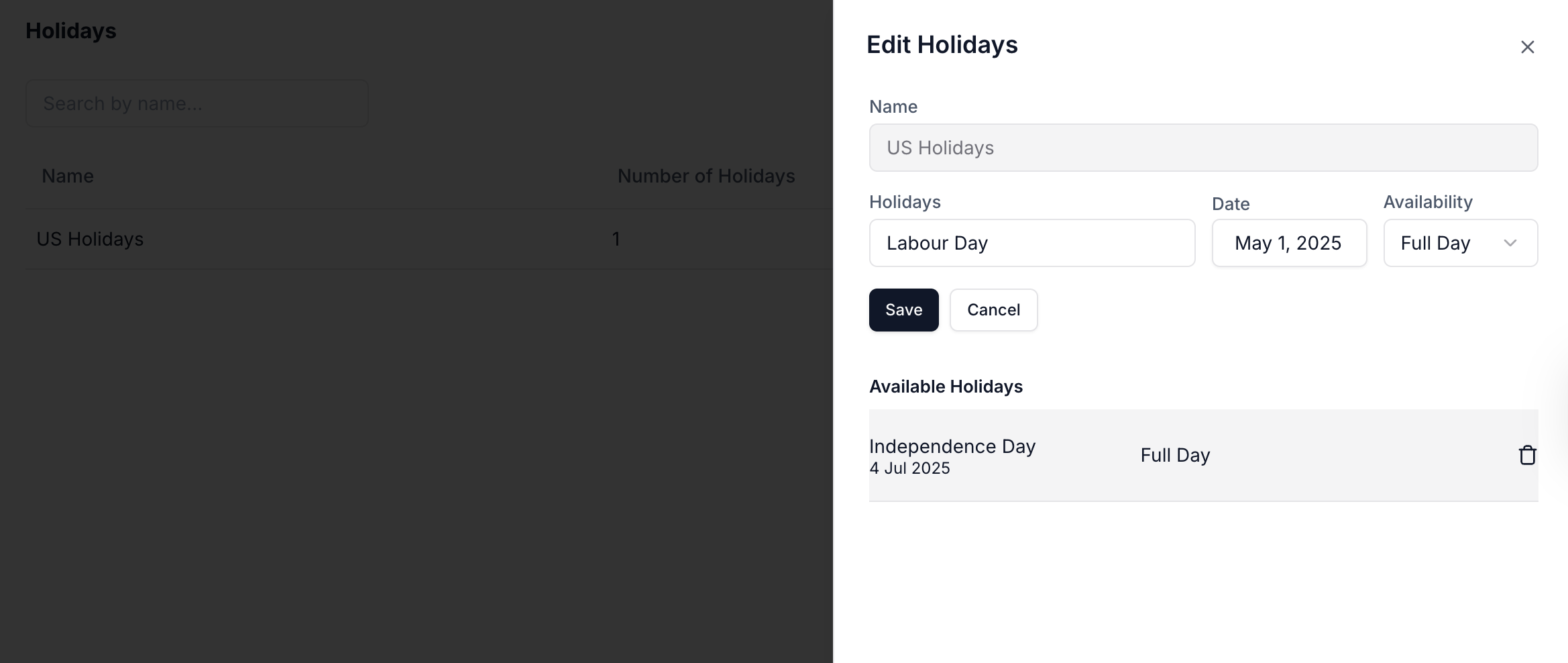
* **Create Named Holiday Lists**: Organize holidays under categories like "US Holidays" or "Regional Office Closures."
* **Add Individual Holidays**: Specify the holiday name, date, and duration (full day or partial).
* **Delete Holidays**: Remove outdated or incorrect entries at any time.
Once defined, holidays can be linked with **Business Hours** and **Queues** to automatically control agent availability and routing logic.
### Example Use Case
If July 4 is marked as a full-day holiday:
* Agents in that holiday group will be considered unavailable.
* Calls or chats routed to their queue may follow the fallback path set in your flow.
### Managing Holidays
* **Create Named Holiday Lists**: Organize holidays under categories like "US Holidays" or "Regional Office Closures."
* **Add Individual Holidays**: Specify the holiday name, date, and duration (full day or partial).
* **Delete Holidays**: Remove outdated or incorrect entries at any time.
Once defined, holidays can be linked with **Business Hours** and **Queues** to automatically control agent availability and routing logic.
### Example Use Case
If July 4 is marked as a full-day holiday:
* Agents in that holiday group will be considered unavailable.
* Calls or chats routed to their queue may follow the fallback path set in your flow.