> ## Documentation Index
> Fetch the complete documentation index at: https://plivo.com/docs/llms.txt
> Use this file to discover all available pages before exploring further.
# Conversation Settings
> Manage conversation timeouts, access permissions, transfer configurations and more.
The **Conversation Settings** section allows you to manage how conversations are handled, routed, and categorized across various channels. From defining timeouts to setting permissions for downloading and transferring conversations, these settings ensure efficient management of agent workloads and improve overall operational flow.
 ## Key Settings
### **Conversation Timeout**
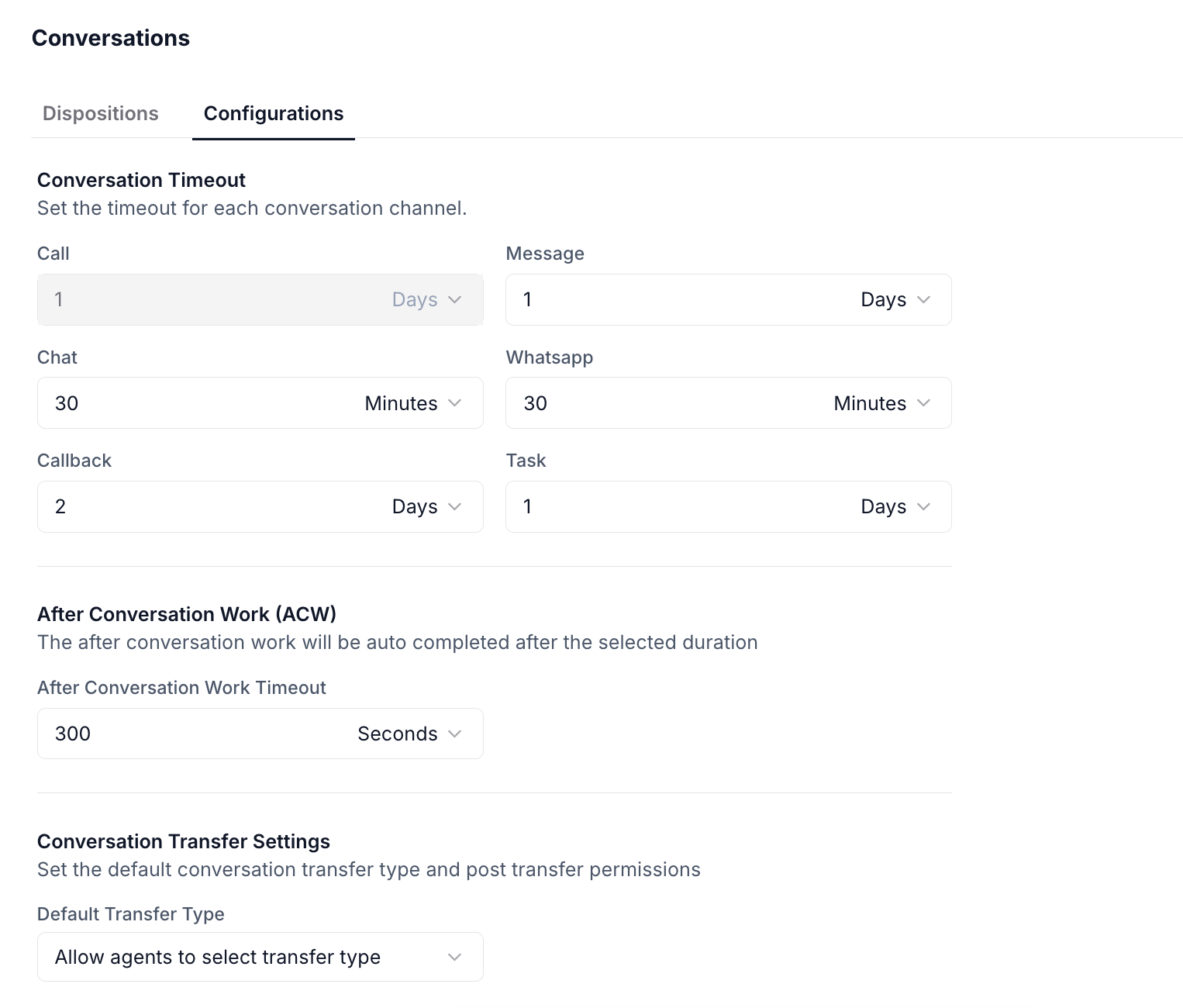
Set timeouts for each conversation channel to ensure timely management and prevent hanging interactions. You can define a timeout for each communication method based on your organization’s response time expectations.
These timeouts can be customized for each channel to reflect the type of interaction and expected response times.
### **After Conversation Work (ACW)**
Once a conversation ends, agents often need some time to complete administrative tasks such as logging notes or categorizing the conversation. The **ACW Timeout** setting helps define the period after which the system will automatically complete this work if the agent does not manually finish it.
* **After Conversation Work Timeout**: Set the duration (e.g., 15 minutes) after which the system will automatically complete ACW tasks for the agent.
This helps streamline post-interaction tasks and ensures that agents don’t leave conversations incomplete.
### **Conversation Transfer Settings**
Control how conversations are transferred between agents, teams, or escalated to supervisors. This section defines whether agents have control over the transfer type and how post-transfer actions are handled.
* **Default Transfer Type**: Choose whether agents can select the transfer type (e.g., *Direct Transfer* or *Consultation*).
* **Transfer Permissions**: Specify whether agents or supervisors can initiate transfers.
These settings enable flexibility in managing how and to whom conversations are handed off.
### **Conversation Access**
Define the **visibility** of conversations for agents and supervisors:
* **Conversation Accessibility for Agents**: Choose whether agents can view **only their own conversations** or access **team’s conversations**.
* **Conversation Accessibility for Supervisors**: Supervisors can be given access to either **team’s conversations** or specific conversations across agents.
These settings allow you to maintain privacy, compliance, and oversight across the organization.
### **Download Permissions**
Allow or restrict agents and supervisors from downloading conversation-related files, such as call recordings or chat logs:
* **Call Recordings**: Enable agents and supervisors to download recorded calls.
* **Conversations**: Allow downloading of full conversation logs for review or documentation.
* **Views**: Enable agents and supervisors to download specific views (e.g., conversation summaries or reports).
These permissions are customizable depending on your organization's security and compliance needs.
### **Default Transfer Disposition**
Set a default **disposition** for conversations when they are transferred. This helps streamline the classification of conversations after a transfer, making it easier to track and report on outcomes.
* **Parent Disposition**: Select a default parent disposition (e.g., *Query Answered*, *Escalated to Supervisor*) that will be automatically applied during a transfer.
This ensures that all transferred conversations are categorized consistently for reporting and analysis.
## Example Use Case
When a conversation is completed:
* The **ACW** period will allow the agent to log notes or finish other tasks within the configured timeout.
* If the agent needs to transfer the conversation to another team, the **Default Transfer Disposition** ensures it is properly categorized.
* **Sticky Routing** ensures any follow-up is directed to the same agent for consistency.
* Supervisors can access **team conversations**, ensuring they can assist or monitor as needed.
## Key Settings
### **Conversation Timeout**
Set timeouts for each conversation channel to ensure timely management and prevent hanging interactions. You can define a timeout for each communication method based on your organization’s response time expectations.
These timeouts can be customized for each channel to reflect the type of interaction and expected response times.
### **After Conversation Work (ACW)**
Once a conversation ends, agents often need some time to complete administrative tasks such as logging notes or categorizing the conversation. The **ACW Timeout** setting helps define the period after which the system will automatically complete this work if the agent does not manually finish it.
* **After Conversation Work Timeout**: Set the duration (e.g., 15 minutes) after which the system will automatically complete ACW tasks for the agent.
This helps streamline post-interaction tasks and ensures that agents don’t leave conversations incomplete.
### **Conversation Transfer Settings**
Control how conversations are transferred between agents, teams, or escalated to supervisors. This section defines whether agents have control over the transfer type and how post-transfer actions are handled.
* **Default Transfer Type**: Choose whether agents can select the transfer type (e.g., *Direct Transfer* or *Consultation*).
* **Transfer Permissions**: Specify whether agents or supervisors can initiate transfers.
These settings enable flexibility in managing how and to whom conversations are handed off.
### **Conversation Access**
Define the **visibility** of conversations for agents and supervisors:
* **Conversation Accessibility for Agents**: Choose whether agents can view **only their own conversations** or access **team’s conversations**.
* **Conversation Accessibility for Supervisors**: Supervisors can be given access to either **team’s conversations** or specific conversations across agents.
These settings allow you to maintain privacy, compliance, and oversight across the organization.
### **Download Permissions**
Allow or restrict agents and supervisors from downloading conversation-related files, such as call recordings or chat logs:
* **Call Recordings**: Enable agents and supervisors to download recorded calls.
* **Conversations**: Allow downloading of full conversation logs for review or documentation.
* **Views**: Enable agents and supervisors to download specific views (e.g., conversation summaries or reports).
These permissions are customizable depending on your organization's security and compliance needs.
### **Default Transfer Disposition**
Set a default **disposition** for conversations when they are transferred. This helps streamline the classification of conversations after a transfer, making it easier to track and report on outcomes.
* **Parent Disposition**: Select a default parent disposition (e.g., *Query Answered*, *Escalated to Supervisor*) that will be automatically applied during a transfer.
This ensures that all transferred conversations are categorized consistently for reporting and analysis.
## Example Use Case
When a conversation is completed:
* The **ACW** period will allow the agent to log notes or finish other tasks within the configured timeout.
* If the agent needs to transfer the conversation to another team, the **Default Transfer Disposition** ensures it is properly categorized.
* **Sticky Routing** ensures any follow-up is directed to the same agent for consistency.
* Supervisors can access **team conversations**, ensuring they can assist or monitor as needed.