> ## Documentation Index
> Fetch the complete documentation index at: https://plivo.com/docs/llms.txt
> Use this file to discover all available pages before exploring further.
# Forwarding Contacts
> Manage customer profiles for personalized communication, tracking, and engagement across channels.
**Forwarding Contacts** allows teams to maintain a centralized list of customer profiles that can be used across live conversations, AI agent flows, and outbound campaigns. Whether you're creating contacts manually or importing them in bulk, this feature ensures all customer interactions are context-aware and personalized.
 ## Manage Contacts
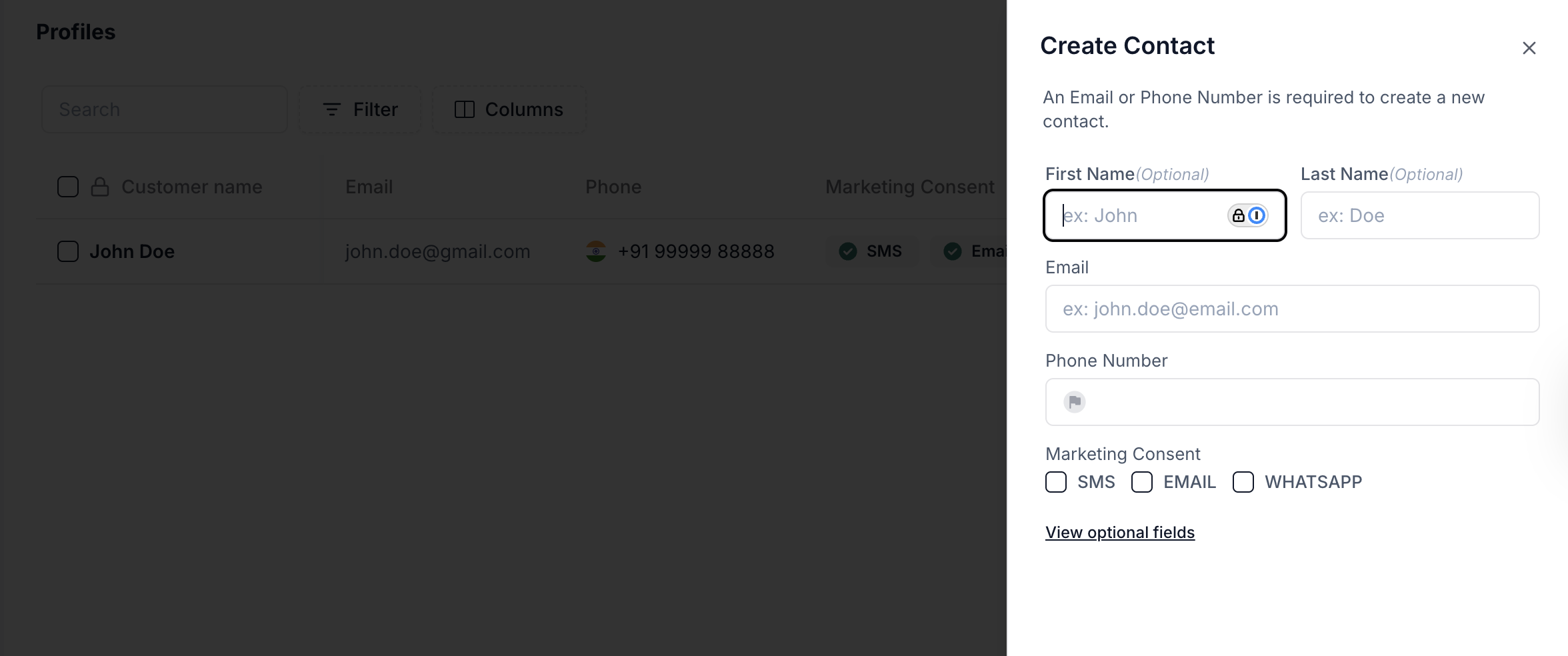
* **Create individual contacts** by entering email or phone number (at least one is required)
* **Import multiple contacts** using a CSV for easy bulk onboarding
* **Store detailed customer info** such as tags, addresses, engagement history, UTM data, and more
* **Use filters and columns** to search, segment, or analyze contacts quickly
* **Reference contact data in flows** or assign conversations to known users
## Creating a Contact
1. Click **New Contact** → **Create New Contact**
2. Provide **Phone Number** or **Email**
3. Optionally fill:
* First Name, Last Name
* Marketing Consent: SMS, Email, WhatsApp
* Tags or address details via "View Optional Fields"
4. Click **Save** to store the profile
This contact can now be used during inbound conversations or targeted for outbound engagement.
## Importing Contacts
To import a contact list:
1. Click **New Contact** → **Import Contacts**
2. Upload a CSV file with supported fields
3. Map the columns to system fields (if prompted)
This is especially useful for migrating CRM data or preloading customers into the system.
## Filter & Search
Use the **Filters** menu to query contacts using any combination of:
* Text fields (e.g., Company Name, Tags)
* Date fields (e.g., Last Seen At, Close Date)
* UTM campaign fields
* Lifecycle or lead status values
Filters support condition-based logic like *contains*, *equals*, *before/after*, making it easy to isolate specific segments.
## Optional Fields (Contact Metadata)
Beyond core identifiers, Plivo supports a rich set of optional fields to enrich user context:
* **Engagement Info**: Last Seen, First Session, Last Session, Created At
* **Marketing Attribution**: UTM fields, Google Click ID, Campaign Names
* **CRM Fields**: Lead Status, Lifecycle Stage, Likelihood to Close
* **Demographic Tags**: Gender, Marital Status, Military Status
* **Device Data**: Browser, IP, User Agent
* **Consent & Flags**: Marketing Consent, Contact Unengaged, Tax Exempt
You can use these values for filtering, reporting, and routing within flows or queues.
## Use Cases
* Route returning users to the right agent or AI flow using stored context
* Enrich agent conversations with full customer details
* Launch outbound engagement to segmented contact lists
* Identify user behavior through tags or marketing data
* Run automation using custom contact filters and UTM attribution
## Manage Contacts
* **Create individual contacts** by entering email or phone number (at least one is required)
* **Import multiple contacts** using a CSV for easy bulk onboarding
* **Store detailed customer info** such as tags, addresses, engagement history, UTM data, and more
* **Use filters and columns** to search, segment, or analyze contacts quickly
* **Reference contact data in flows** or assign conversations to known users
## Creating a Contact
1. Click **New Contact** → **Create New Contact**
2. Provide **Phone Number** or **Email**
3. Optionally fill:
* First Name, Last Name
* Marketing Consent: SMS, Email, WhatsApp
* Tags or address details via "View Optional Fields"
4. Click **Save** to store the profile
This contact can now be used during inbound conversations or targeted for outbound engagement.
## Importing Contacts
To import a contact list:
1. Click **New Contact** → **Import Contacts**
2. Upload a CSV file with supported fields
3. Map the columns to system fields (if prompted)
This is especially useful for migrating CRM data or preloading customers into the system.
## Filter & Search
Use the **Filters** menu to query contacts using any combination of:
* Text fields (e.g., Company Name, Tags)
* Date fields (e.g., Last Seen At, Close Date)
* UTM campaign fields
* Lifecycle or lead status values
Filters support condition-based logic like *contains*, *equals*, *before/after*, making it easy to isolate specific segments.
## Optional Fields (Contact Metadata)
Beyond core identifiers, Plivo supports a rich set of optional fields to enrich user context:
* **Engagement Info**: Last Seen, First Session, Last Session, Created At
* **Marketing Attribution**: UTM fields, Google Click ID, Campaign Names
* **CRM Fields**: Lead Status, Lifecycle Stage, Likelihood to Close
* **Demographic Tags**: Gender, Marital Status, Military Status
* **Device Data**: Browser, IP, User Agent
* **Consent & Flags**: Marketing Consent, Contact Unengaged, Tax Exempt
You can use these values for filtering, reporting, and routing within flows or queues.
## Use Cases
* Route returning users to the right agent or AI flow using stored context
* Enrich agent conversations with full customer details
* Launch outbound engagement to segmented contact lists
* Identify user behavior through tags or marketing data
* Run automation using custom contact filters and UTM attribution